Accessing Shares from Clients
The Hammerspace Global File System is fully multiprotocol. Applications and end users can simultaneously access shares over SMB and NFS from Windows, macOS, and Linux clients, as described below.
Accessing Shares from Windows
-
Open Windows File Explorer, right-click the computer icon, and select Map network drive….
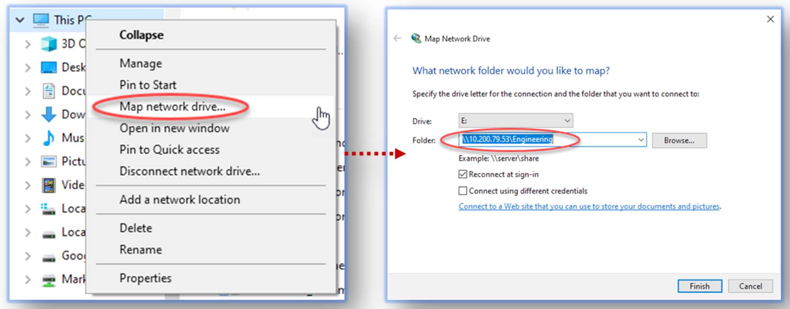 Figure 1. Location of Map network drive
 -
Enter the IP address or hostname followed by the share name, and select the appropriate options.
Accessing Shares from macOS
On macOS, use the Finder Connect to Server dialog to mount a share from a DSX node.
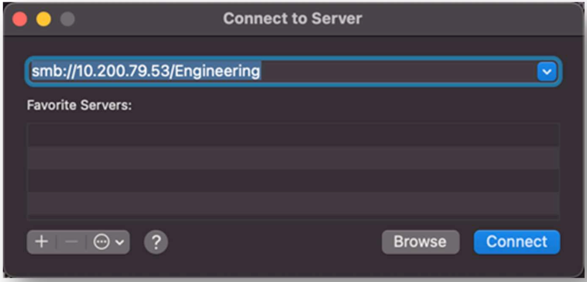
Mounting NFS Exports from Linux
Depending on the Linux distribution, there may be a preference for using the mount command with options or the mount.nfs command, as shown below.
# mount.nfs <DSX-node>:/<export-path> <mount-path>Or:
# mount -t nfs -o vers=3 <DSX-node>:/<export-path> <mount-path>
Some client systems may require additional NFS options, such as nolock and/or rw. Consult the documentation for each distribution.
|
Using Parallel NFS (v4.2) for High-Performance Workloads
Mounting shares using NFSv4.2 is slightly different from NFSv3 and SMB. NFSv4.2 exports are available from the Hammerspace metadata server (Anvil), while NFSv3 and SMB exports are available from any of the DSX nodes.
How to Mount Anvil Using NFSv4.2
# mount -t nfs -o vers=4.2 <anvil-node>:/<export-path> <mount-path>NFSv4.2 is a more modern protocol with significant performance improvements. Only relatively recent Linux versions (for example, RHEL/CentOS 7.5 and later) have the most recent fixes. For some older Red Hat/CentOS Linux versions, Hammerspace has done the work to backport the upstream fixes.
| Most Linux versions available in the cloud are capable of mounting NFSv4.2. For more information, see RFC 5661 and RFC 8434, or contact Hammerspace at support@hammerspace.com. |