Assimilation Phases
The following diagram shows the three high-level phases of an assimilation. Note that the assimilation and data migration phases can overlap.
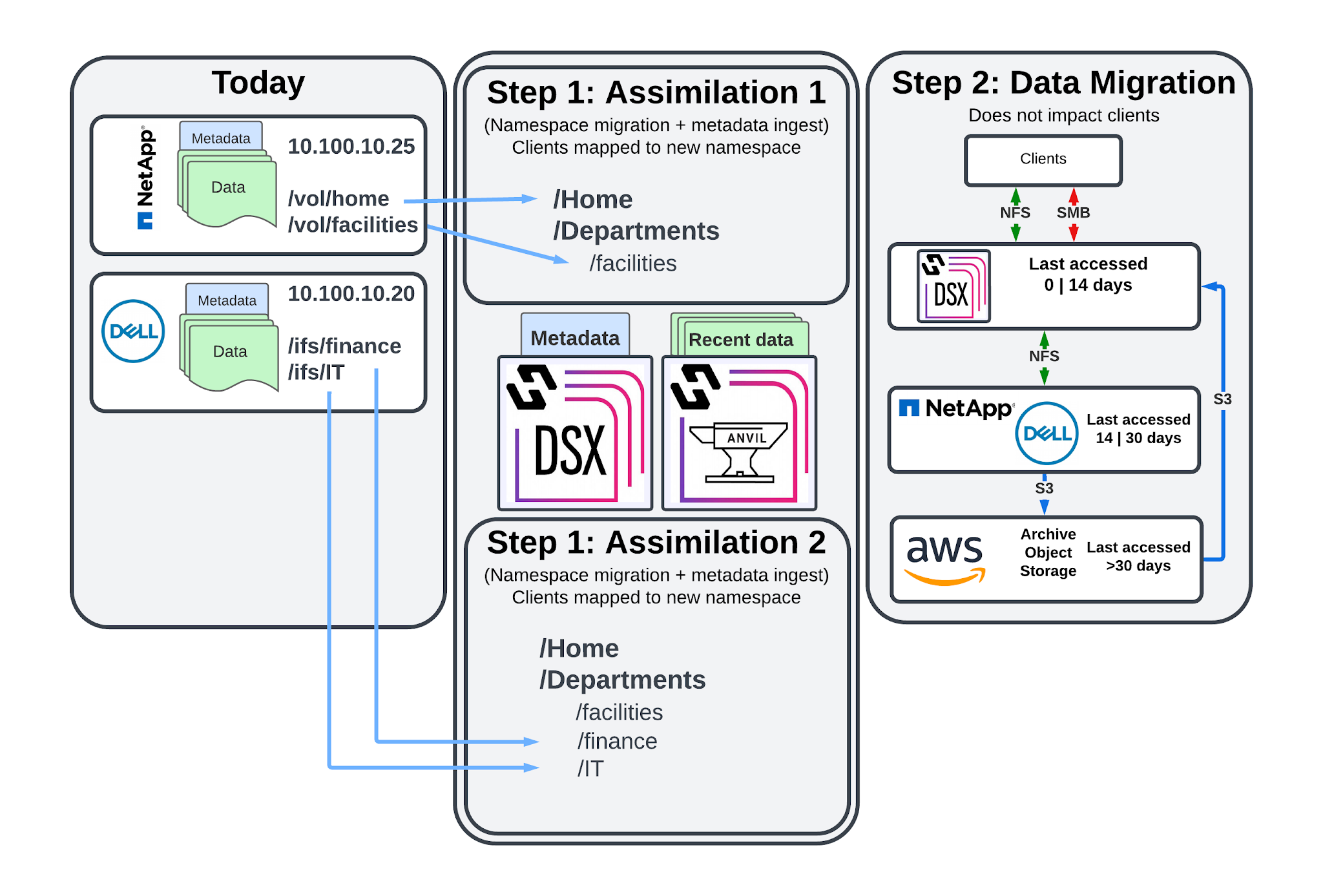
Figure 4: Hammerspace Assimilation Phases
-
Pre-Assimilation Phase - In this phase, no changes have been made and clients are still connected to the original NAS source(s). Typical activities during the phase include planning how the migration to Hammerspace will proceed, designing the new namespace, assessing the source data (file counts and capacity), and verifying client compatibility (with Hammerspace) and connectivity requirements.
-
Assimilation Phase - The assimilation process is where the existing namespace (the file/folder metadata) is migrated to Hammerspace on a per share/export basis, and clients are then connected to Hammerspace to access that data.
-
It is also possible to replicate the namespace to another Hammerspace site at this time.
-
Immediately prior to an assimilation, clients are typically disconnected from the shares/exports that are being assimilated.
-
Shortly after the assimilation begins, clients are connected to the new share/export now hosted by Hammerspace.
-
-
Data Orchestration Phase (Optional) - In this phase, Hammerspace data orchestration begins to move data based on the share objective configuration.
-
This process has no impact on client access to data, and can include the mobilizing of data to additional Hammerspace sites in a global file system.
-
These phases are described in greater detail in the following sections.
Pre-Assimilation Phase
Hammerspace recommends breaking down assimilation planning into a series of dependent tasks. In this section, we will review the most common tasks that are critical to ensuring a supported, successful assimilation.
Verify Sources Support Assimilation
The first step in the pre-assimilation phase is to confirm that the assimilation source is supported. While it is possible to migrate data manually using third party tools, none of those are able to minimize downtime and overall effort required like an assimilation.
The following are the core requirements in order to be able to use the assimilation process:
-
NFSv3 is required for assimilation, even if no NFSv3 clients access the data today.
-
If NFSv3 is not supported, then data must be migrated to Hammerspace manually using tools such as robocopy or rsync.
-
-
If the SMB ACLs (referred to as AD Metadata in the Hammerspace GUI) must also be assimilated, the source NAS should:
-
Support simultaneous NFSv3 and SMB access. If it does not, then the SMB ACLs cannot be assimilated and the Hammerspace share root folder ACLs will be applied to the assimilated files.
-
While copying SMB ACLs is not required in order to assimilate data, all custom ACLs will be lost and replaced with the new share defaults if Hammerspace is unable to assimilate the AD Metadata.
| Some source NAS devices, such as NetApp, may have unique volume configurations that impact the ability of Hammerspace to accurately assimilate AD metadata. Consult Hammerspace support for any NAS-specific assimilation requirements or recommendations. |
Review Share multi-Protocol Requirements
The next step in the pre-assimilation phase is to assess any multi-protocol access requirements on a per-share/export basis. Hammerspace supports RFC2307/RFC2307bis to enable consistent ID mapping across Windows and Linux environments. As such, any customer that has multi-protocol shares will need to take steps to ensure that there are no interruptions in access post-migration to Hammerspace.
The steps required to implement RFC2307/RFC2307bis will be unique to each customer, and in many cases require guidance outside the scope of this document. Hammerspace will provide general guidance where possible, but the customer is ultimately responsible for making the changes needed to support RFC2307/RFC2307bis.
The following is a high-level outline of common tasks often required for customers who are new to RFC2307 and Hammerspace:
-
Any NAS-based manual user mapping will need to be migrated to Active Directory (uid/gid attributes for RFC2307, uid/gid/member attributes for RFC2307bis).
-
Any many to one or one to many Unix to AD mappings should be converted to globally unique, one to one mappings to ensure a predictable experience.
-
UID and GID values must be unique throughout the Active Directory forest.
Designing Your Global Namespace
Planning for the unification of all namespaces is a key part of ensuring that the assimilation process proceeds without any unexpected complications. When assimilating from more than one source NAS, or from a source NAS that is using some sort of multi-tenancy functionality, an examination of the existing namespaces should be performed with confirmation of the following:
-
Are there any duplicate share/export names among all the assimilation sources?
-
If duplicates exist, only one can keep the original name.
-
This includes duplicates that are present in separate tenants such as Isilon zones or NetApp SVMs (discussed next).
-
-
Does the source NAS utilize any multi-tenancy capabilities such as Isilon zones or NetAPP SVMs? If so, please note:
-
A Hammerspace cluster can be placed on multiple networks, though each will see all available shares unless a feature like access-based enumeration (enabled using objectives) is used.
-
As mentioned previously, share names must be unique across the entire global namespace.
-
-
Does the structure of the source share/exports impact the migration plan? For example:
-
If the entire share/export cannot be assimilated in a single session from the root folder, how will you manage the transition?
-
If the share/export contains aliases that provide access to subfolders, have you documented those so that they can be created after the assimilation has started?
-
Where possible, Hammerspace recommends obtaining a combined list of all NAS sources and all current share/export names to utilize during planning of the new namespace design. While Hammerspace will prevent you from creating shares with duplicate names, it is much easier to identify this ahead of time and plan for how to mitigate it then after the fact.
Assimilation Phase
This document will refer only to assimilation tasks that involve Hammerspace, as it is assumed that the reader is familiar with what is required to migrate clients, applications, and so on to a new location. This includes identifying data owners, verifying any unique requirements, identifying post-cutover test criteria and who will perform the tests, and determining what defines a successful cutover and migration.
Prepare for the Assimilation Start
Prior to performing the assimilation, you should prepare the destination Hammerspace share. The following tasks are most commonly performed during or after the share creation process:
-
Apply any needed objectives
-
Configure the NFS export rules
-
Configure the SMB share (not folder) permissions
-
Configure the share root folder permissions if AD Metadata will not be assimilated
Start the Assimilation
Once the destination Hammerspace share has been created, you are ready to begin the assimilation process.
An assimilation typically proceeds in the following order:
-
Stop any applications that are actively writing to the assimilation source share/export to ensure that the data on disk is application consistent.
-
Modify the NFS export rules so that only Hammerspace cluster IPs can access the export (NFS outage begins at this time).
-
If assimilating SMB ACLs, modify the share permissions (not folder) so only the Hammerspace AD service account has access to the share (SMB outage begins at this time).
-
Start the assimilation process and monitor the progress using the task-list command. Once the root folder of the source has been assimilated, clients can be connected to the share/export on Hammerspace (NFS/SMB access to share/export root is restored).
-
Recreate any SMB aliases as needed; note that you should access the alias target folders prior to creating the alias to ensure that they have been assimilated. Once the aliases have been created, SMB clients can be connected to them on Hammerspace (SMB access to share aliases is restored).
You can also choose to assimilate from a NAS snapshot, though you should still plan to stop client access to the live source volume prior to beginning the assimilation. Reason being if you are assimilating from a snapshot and clients are still connected to the live share/export, any changes they make will not be captured during the assimilation.
| Snapshots are primarily recommended for performing a test assimilation, as you should not attempt to assimilate from a volume where clients are actively writing data. |
Data Orchestration Phase
Almost all Hammerspace implementations will include some sort of data orchestration, even if the orchestration is to occur later. Here are the most common scenarios where orchestration is used:
-
Move data from the source NAS to a new location.
-
Move data that has not been used for some time to an object storage volume.
-
Move data to one or more storage tiers based on when it was last used, or some other determining factor.
It is important to note that many Hammerspace implementations include all three of the previous orchestration examples. For more examples of how Hammerspace objectives are used to orchestrate data, refer to the How to Configure Hammerspace Objectives [Support article may require login to view.].
When leveraging Hammerspace to migrate data from an existing NAS, the process typically happens in the following order:
-
Assimilate the source volume.
-
Migrate data using Hammerspace objectives.
-
Decommission the data source volume to formally end the data migration.
In the following section, we will provide more detail about the tasks related to data orchestration and migration.
Data Orchestration - Configuration
In most cases, data orchestration will be explicitly controlled using Hammerspace objectives. The following collection of objectives shows a three-tier configuration where files are moved to ("placed on") one of three tiers based on when they were last used:
| Objective | Condition |
|---|---|
place-on-NFS-NVMe-Tier1 |
LAST_USE_AGE < 14*DAYS |
place-on-NFS-SSD-Tier2 |
LAST_USE_AGE >= 14*DAYS AND LAST_USE_AGE ⇐ 45*DAYS |
place-on-S3-Tier3 |
LAST_USE_AGE > 45*DAYS |
Default Orchestration Behaviors
Some data orchestration will occur due to the default share objectives. While the details regarding when and why these orchestrations might occur is outside the scope of this document, some common examples include:
-
Data being moved to object storage if the current NAS volume reaches a certain threshold.
-
Newly created files being written to DSX volumes, rather than the attached legacy NAS volumes.
-
Two copies of a file being created for resiliency purposes.
In most cases, you will configure your own objectives that place data based on your requirements.
Migrating Data Using Hammerspace
When migrating from an existing storage platform to Hammerspace, you will typically initiate a data migration using two methods:
-
Implement Hammerspace objectives that relocate the data to the desired location(s); this can be at any point after the assimilation has begun.
-
Decommission the source NAS storage volume once the assimilation is complete; this will cause the cluster to move any files that have not yet migrated using the highest priority mobility type.
| The decommission process is always the last step in a data migration, even if the files were relocated using the share objective. Once the decommission process completes, the source volume will be removed from the Hammerspace cluster to signal that it is no longer required. |
Observing Orchestration Activity
The Hammerspace GUI provides both a list-based and graphical representation of the data orchestration activities, which the cluster refers to as mobilities.
The following image shows an example of the Hammerspace mobility chord diagram that depicts files moving from several volumes to several different volumes.
-
The dark end of the bar represents where the files are moving to.
-
The light side represents where they are moving from.
This diagram is typical of a migration that is moving files from a large number of volumes to another group of volumes.
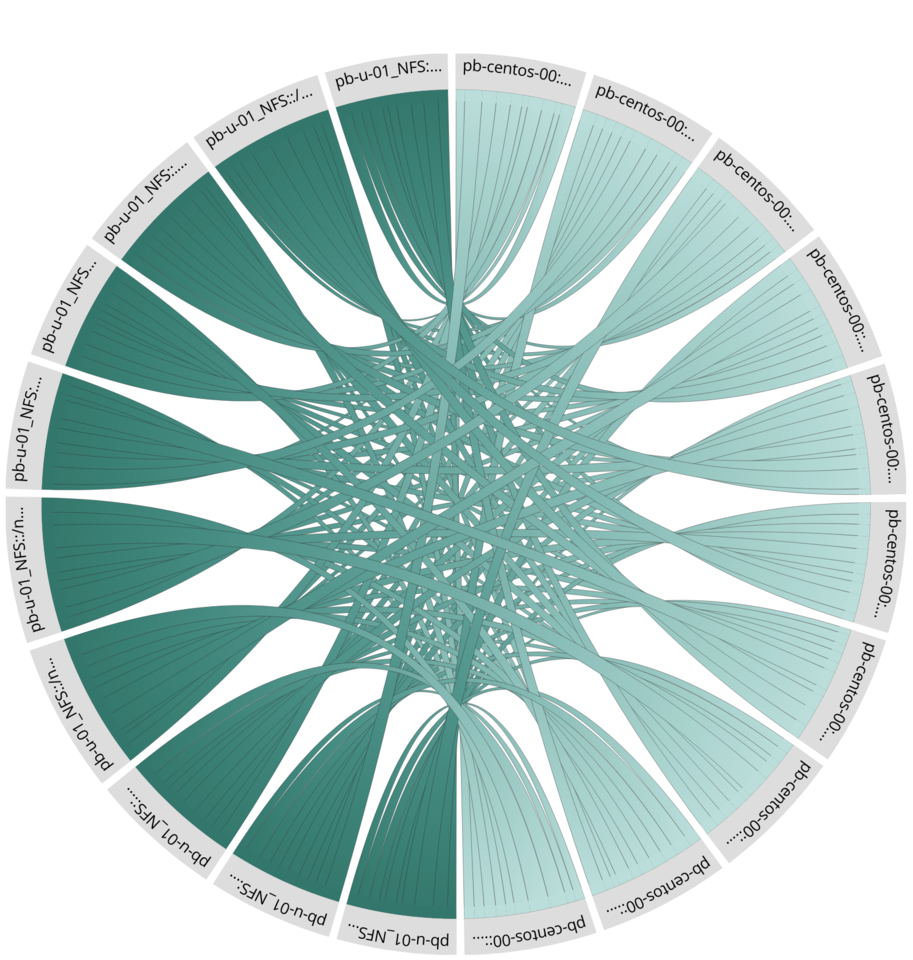
Figure 5: Hammerspace Mobility Chord Diagram
The throughput at which these mobilities occur is largely dependent on two general factors:
-
How many items currently await mobilization
-
How many concurrent mobilities the cluster can support
Hammerspace support can adjust the number of concurrent mobilities the cluster will attempt to increase the throughput, though an analysis of any possible infrastructure limitations (such as source NAS throughput capabilities) is recommended before they make any changes to the default settings.
Common Mobility Types
Following an assimilation of a read-only volume, the most common assimilation, you will typically see three different mobility types:
-
On-demand - This occurs when a client has opened a file that has not yet migrated. Note that in some cases, how the file was opened impacts whether or not it needs to be mobilized first.
-
Location - Indicates that an objective directed the file be placed somewhere else.
-
Contention - Indicates that the file was mobilized for some higher priority reason, such as the volume it is currently on is being decommissioned.
While there are more types of mobilities, these three are the most common ones you will see when performing assimilations and the subsequent migration of data.