Assimilation - Under the Hood
When Hammerspace assimilates data, all existing file metadata is extracted and stored in the Anvil metadata database including all file details, timestamps, and any other values you may know. Hammerspace also extends the metadata to include new values to support Hammerspace data orchestration.
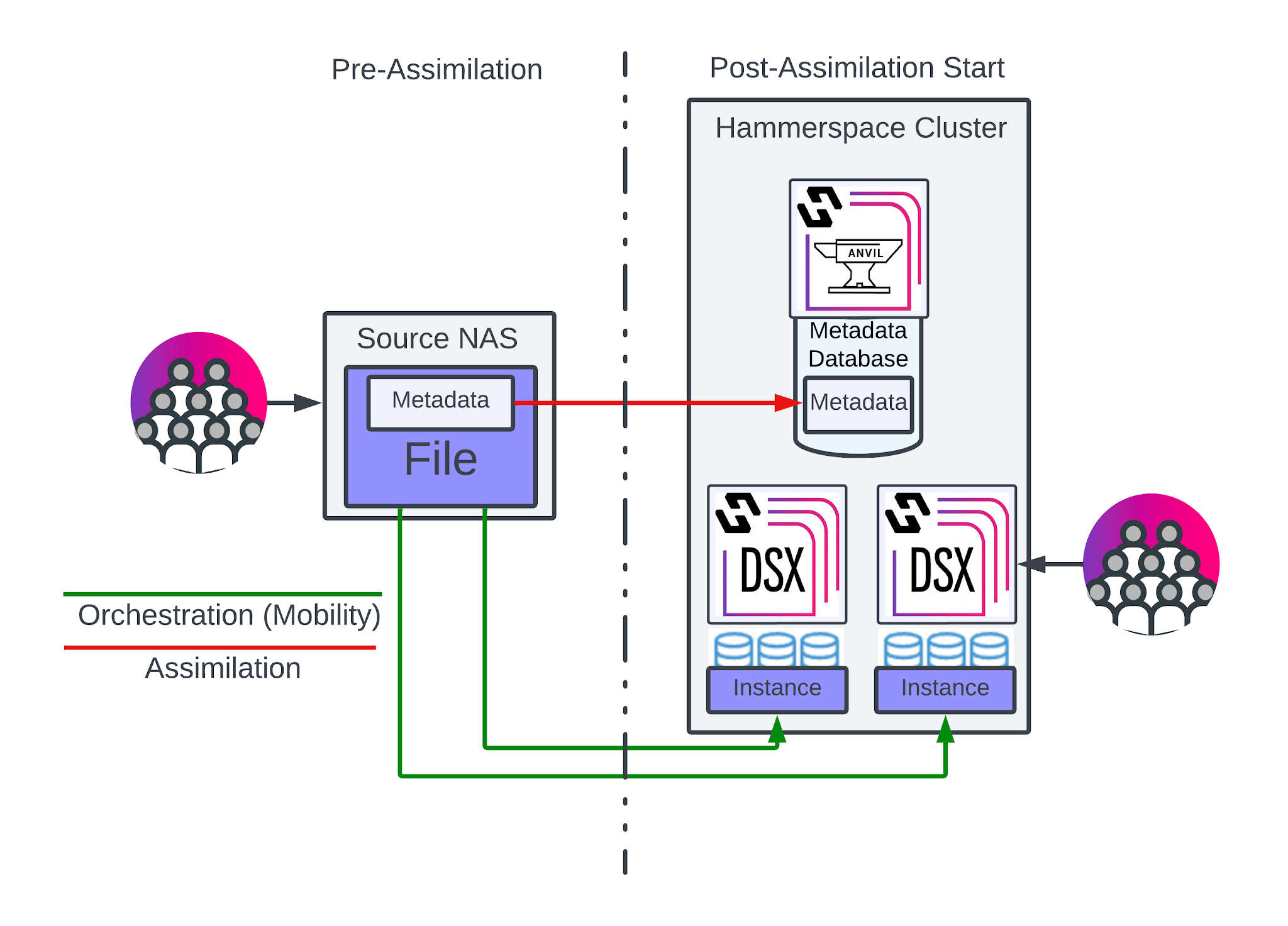
Figure 3: Hammerspace Assimilation
In the diagram above, we see a typical NAS environment on the left, including the file with its metadata. While functional, this architecture makes interacting with the file metadata inefficient as any metadata operation will compete with file IO operations. If you attempt to layer data orchestration on top of this legacy architecture, the chances that it would impact file IO performance would only increase.
On the right, we see how the file and its metadata have been separated so that the metadata is hosted within a dedicated database on Hammerspace Anvil nodes. Interacting with the metadata has no direct impact on the file IO data managed by Hammerspace DSX nodes. The file instances are placed in one or more writable volumes as directed by Hammerspace objectives, filed away into a customized comb structure that simplifies the process of storing and locating them.
Even with this re-architecture of how file metadata is stored and how file instances are managed, the client interacts with the file system just as they did before. They see the same file and folder structure, permissions, and file metadata, but the underlying storage can now orchestrate data invisibly based on whatever requirements the organization requires.
| In the example above, two instances of the file were created using Hammerspace objectives. Refer to the How to Configure Hammerspace Objectives [Support article may require login to view.] for more details on how Hammerspace objectives are designed and implemented. |
File Instances and the Comb Structure
Clients do not interact with the stored files directly. They instead connect to a virtual portal that uses the Hammerspace Anvil metadata database to present a view of the filesystem. On disk, the files are renamed and placed into an optimized comb structure of folders.
In the following example, we used the Hammerspace Toolkit to query the file metadata and list where the actual file instances reside.
$ hs eval -e this telemetry.txt | grep -e VOLUME -e PATH
VOLUME = STORAGE_VOLUME('hs-dsx-2.catalyst.local::/hsvol1'),
PATH = "/PrimaryData/Instances/1/0/3240/v65-f1-8000000000008ca6",
VOLUME = STORAGE_VOLUME('S3-Bucket-East'),
PATH = "000245/5D/0002455D3FD88C6E4DA03440A35CD744238D9CD21DFEAEDBC15D4E93349535F3F3BA0000000000000245",
VOLUME = STORAGE_VOLUME('S3-Bucket-West'),
PATH = "000245/5D/0002455D3FD88C6E4DA03440A35CD744238D9CD21DFEAEDBC15D4E93349535F3F3BA0000000000000245",
As you can see, there are 3 instances of the telemetry.txt file available. One is located on a Hammerspace DSX node (hs-dsx-2.catalyst.local) while the other two are located on object storage volumes (S3-Bucket-East and S3-Bucket-West). Note that the instances do not reuse the actual file name or path that the end user sees. Only the metadata database holds those values.
The naming of the instance files and folders in the comb structure is done to optimize the performance of the metadata database, as well as the interaction with the file instances.
|