Architecture and Concepts
Before implementing persistent storage for Kubernetes with Hammerspace, it helps to understand the architecture, why Hammerspace pairs well with Kubernetes, and how CSI volume provisioning works.
Architecture
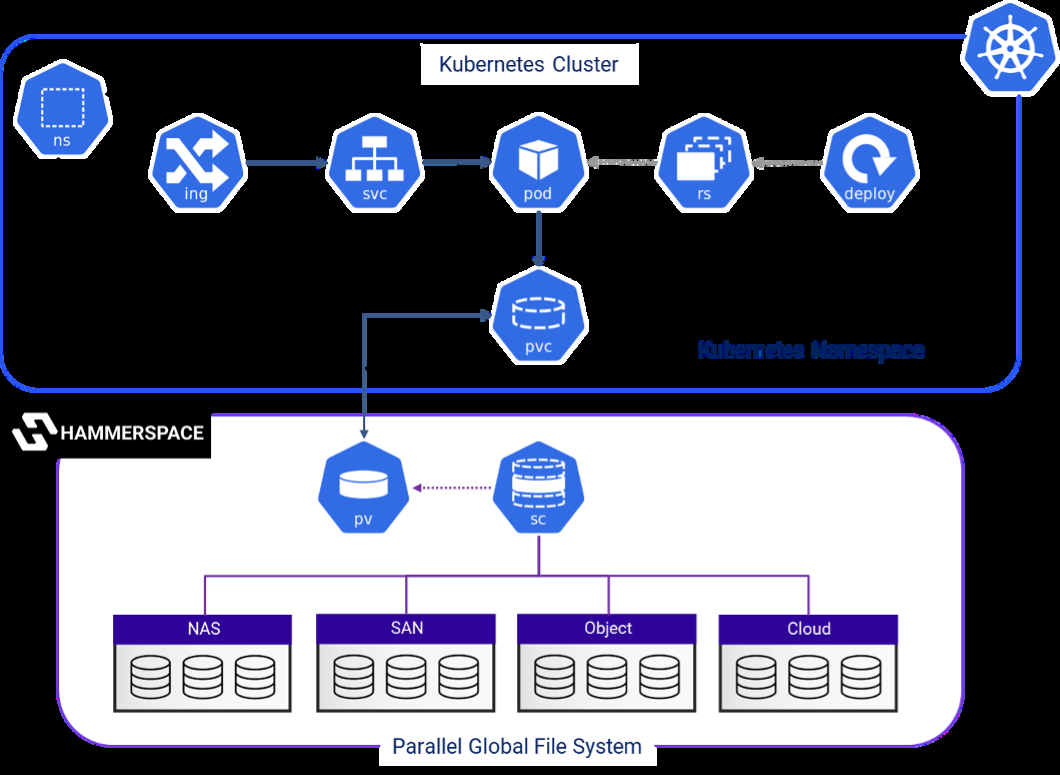
The diagram below illustrates a single Kubernetes application with Hammerspace Parallel Global File System. Hammerspace can provision block volumes, local file volumes, as well as shared NFS volumes to Kubernetes Pods.
Why Hammerspace with Kubernetes?
The Hammerspace CSI Plugin makes it easy for organizations to dynamically provision their stateful container workloads running on Kubernetes, both on-premises and in the cloud.
Administrators have the option of manually provisioning Hammerspace shares, using the community nfs-csi driver, using the power behind the Hammerspace CSI driver, or a combination of these options.
The Hammerspace CSI driver provisions persistent container storage from the Hammerspace storage environment, extending the rich capabilities of Hammerspace Objectives, snapshots, and global filesystem.
Understanding CSI and Volume Provisioning
The first thing that we should understand is that CSI stands for Container Storage Interface. The official CSI Introduction documentation states:
The Container Storage Interface (CSI) is a standard for exposing arbitrary block and file storage systems to containerized workloads on Container Orchestration Systems like Kubernetes. Using CSI third-party storage providers can write and deploy plugins exposing new storage systems in Kubernetes without ever having to touch the core Kubernetes code.
A CSI driver enables Kubernetes users to set up storage without the need to understand the intricacies of the underlying storage infrastructure. The storage setup is concealed, eliminating the requirement for administrator intervention during capacity provisioning. This substantially lightens administrative responsibilities, allowing Kubernetes users to concentrate on managing their Kubernetes environment. As a result, developers are no longer required to submit tickets and wait for a storage administrator to allocate a share for them.
Whenever we create files or store data in Kubernetes, all the data storage goes away once the container stops running. To ensure that the data remains persistent even if the container stops, volumes must be allocated to the Kubernetes Containers through static and dynamic volume provisioning.
Static volume provisioning refers to the manual allocation and configuration of storage volumes before they are needed by pods. It requires administrators to pre-allocate and manage storage resources in advance so that the data remains persistent after the containers stop running.
There may be a case when the PersistentVolumeClaims (request for storage) does not match with the Persistent Volume created by the administrator. In this case, the cluster dynamically provisions the volume for the PersistentVolumeClaim (PVC) using the concept of StorageClass. The administrator defines the StorageClass that contains the fields provisioner, parameters, and reclaimPolicy. The PVC then requests the StorageClass to dynamically provision the storage volumes to the pod.
Here are the key differences between static and dynamic provisioning.
| Static provisioning | Dynamic provisioning |
|---|---|
Administrators manually allocate and configure storage volumes. |
Storage volumes are automatically provisioned based on demand. |
Requires manual intervention and pre-allocation of resources. |
Automates provisioning process and reduces manual effort. |
May lead to the underutilization of resources if resources are allocated more or less than the requirement. |
Optimizes resource usage by provisioning volumes on demand. |
Ideal for environments with predictable storage requirements. |
Well-suited for dynamic workloads and cloud-native environments. |
More complex to manage and maintain at scale. |
Simplifies storage management and improves cluster efficiency. |
This document will explore both approaches to storage management in Kubernetes.
Understand Your Use Case
It is essential for administrators to understand their organization’s intended usage of the available storage resources as well as how they wish to consume them. With this knowledge, they will be able to determine which tools are best suited to meet their specific needs and requirements.
By understanding the capabilities and purposes of each tool, administrators can make informed decisions about which ones to use in their Kubernetes environment.