Create a Local User for S3 Access
Hammerspace S3 supports both a local identity provider using cluster local accounts and Active Directory (AD) for AD accounts. Access keys and secret keys will need to be created for each one regardless of which account is used.
The following procedure outlines how to create a local Hammerspace user for the purpose of S3 access, a requirement for using a Hammerspace S3 server that uses a local identity provider.
-
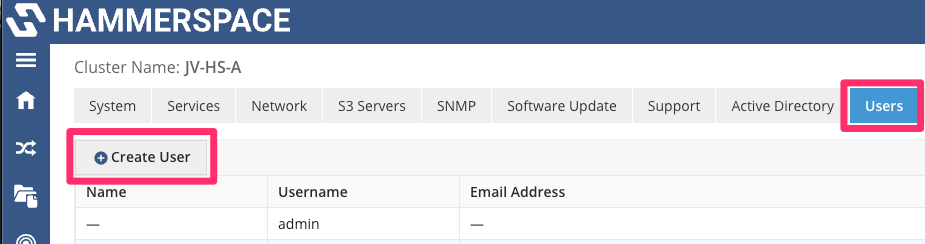
Navigate to Users from the cluster Administration menu and click Create User.
-
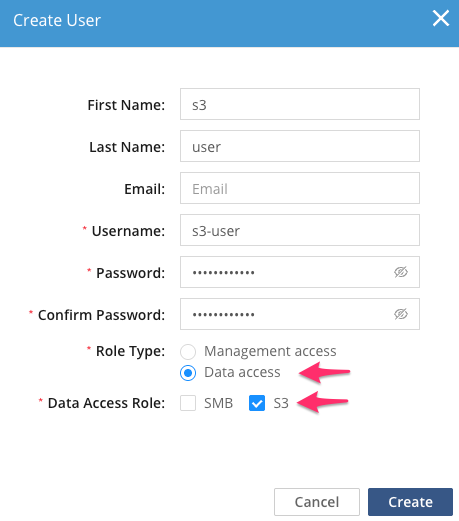
Provide a unique username and password, select Data access for the Role type, click the Data Access Role S3 check box, and click Create.
-
Confirm the new S3 user is listed among the local Hammerspace users. Note that while you did set a username and password, access to S3 requires a separate access key and secret key.
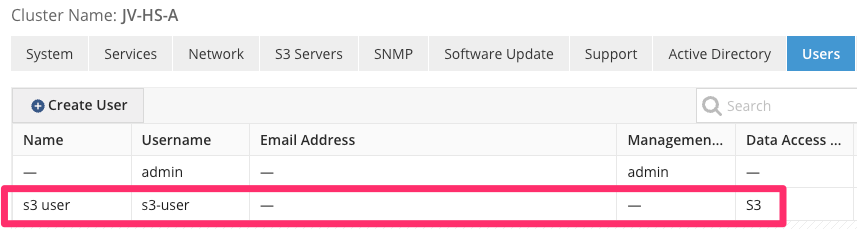
Remember the S3 username, as you will need it when creating S3 buckets. If more local users are required, create them at this time.