Architecture
To understand how S3 multitenancy works in Hammerspace, it is necessary to understand a little bit about Hammerspace’s overall architecture. Keep in mind this document is focused on S3, so not every facet of Hammerspace is covered. For a more thorough treatment of Hammerspace’s capabilities, refer to the Hammerspace Technology White Paper on hammerspace.com and the product documentation.
Hammerspace Big Picture
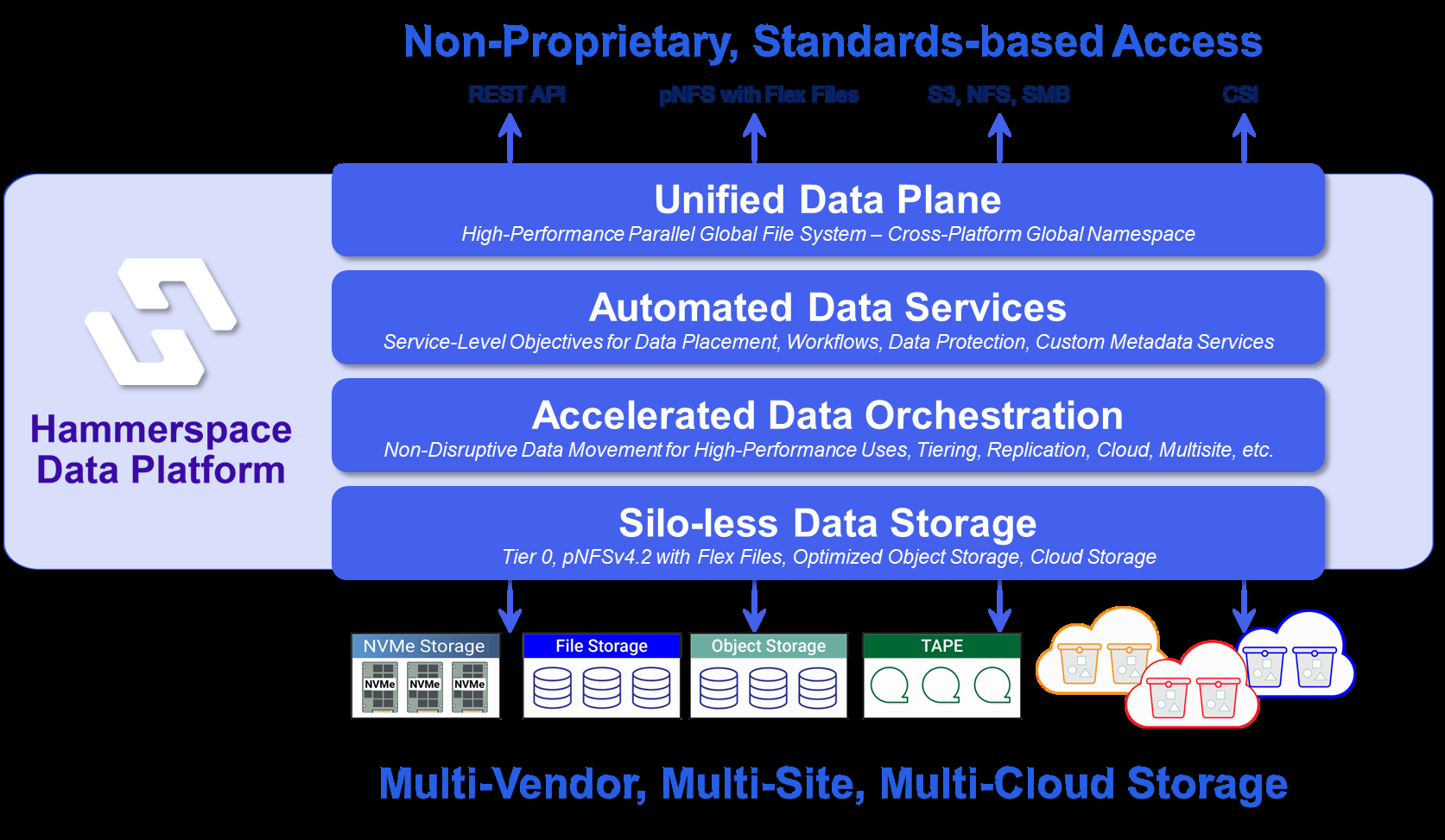
Hammerspace is software that unifies storage into a global namespace, acting as an abstraction layer that separates data presentation from storage. Users and applications see standard NFS exports, SMB shares, S3 buckets, etc., but the data stored via these interfaces is not tied to any particular storage system. Data orchestration makes data within the global namespace mobile across storage systems, types, sites, and clouds, transparently.
Creating a unified data plane in this way streamlines administration by centralizing services like data protection, archiving, and security. Storage silos are eliminated, and storage migrations are non-events, occurring completely without disruption to users and applications. Data on preexisting storage isn’t left behind, either. It can be rapidly assimilated into the Hammerspace global namespace while leaving it in place. Access control, share permissions, anti-virus scanning and WORM are managed from one place, not fragmented across multiple systems.
When using Hammerspace as a multi-tenant object store, this means:
-
Storage freedom of choice - Use any mix of storage systems and change them at any time, without disruption
-
Performance scales up and out
-
Built-in data protection and tiering capabilities, which reduce risk and help control costs
-
Multi-site and multi-cloud support. Backing storage can be any storage, anywhere
Next, let’s look in more detail at how these capabilities are implemented.
Hammerspace Multitenant S3 Building Blocks
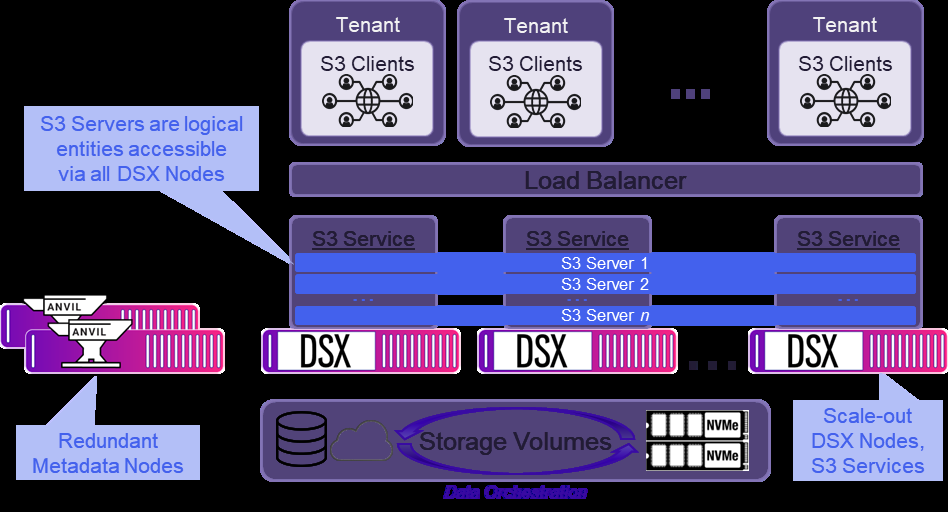
The figure below shows the components of a Hammerspace installation providing S3-based object storage services to clients across multiple tenants. The subsections that follow explain the functions of each component. Hammerspace software runs on bare-metal or virtual infrastructure, including all popular public clouds, which means the Anvil and DSX nodes shown may be physical servers, virtual machines (VMs), or cloud compute instances.
Tenants
Tenants are the entities that are securely sharing the S3 services provided by Hammerspace. A tenant may correspond to an organization, a group within an organization, or an application. A tenant may have one or more S3 clients associated with it.
S3 Clients
S3 clients are the users and applications that consume the S3 storage services provided by Hammerspace. They interact with Hammerspace S3 services just as they would with any other S3-compatible storage service, authenticating with access key / secret key pairs and issuing GET, PUT, and other S3 commands. For the full list of supported S3 commands, refer to the Hammerspace Administration Guide.
Load Balancer
To scale performance and provide resilience against failures, S3 services are configured in a redundant, scale-out fashion across multiple nodes. Incoming S3 client requests are spread across all nodes using a customer-provided load balancer.
Load balancers can be static, such as simple round-robin DNS, or dynamic. Dynamic load balancing can get fancy, but in its simplest form, it detects when a server is down and routes traffic to other servers instead. Either static or dynamic load balancing can be used in a multitenant Hammerspace S3 environment, but each approach has pros and cons. The load-balancing strategy is covered in the tenant-isolation section.
Anvil Nodes
In every Hammerspace site, a redundant set of Anvil nodes is responsible for all metadata. Anvils also schedule and monitor data mobility activity, host the UI, and handle other cluster administrative functions. If a Hammerspace installation spans multiple sites and/or clouds, each site has its own Anvil nodes. Anvils are never in the data path.
DSX Nodes
DSX, short for Data Services eXtension nodes, can serve several storage and data-related roles in a Hammerspace cluster. They host client protocol services, including S3, and they execute data orchestration tasks under the direction of the Anvils. DSX nodes may also host block storage volumes. When more performance is needed for DSX-related functions, additional DSX nodes (up to 60) are deployed to scale out. This enables very high-performance, high-volume use cases.
S3 Service
Every DSX node contains an independent, stateless S3 service that may be enabled or disabled. When enabled, that node can service S3 requests from clients. A load balancer distributes S3 requests across S3-enabled DSX nodes.
S3 Server
S3 servers are the endpoints for S3 client connections to a Hammerspace cluster. Similar to Hammerspace SMB and NFS shares, S3 servers are logical entities, not tied to specific DSX nodes. Every S3 server is accessible through every DSX node with an active S3 service. A Hammerspace cluster may host up to 2048 S3 servers as of the time of this writing. For current information on product limits, refer to the Release Notes.
When Hammerspace is used to store objects, the S3 server is the fundamental unit of multitenancy. Each tenant is assigned one or more S3 servers, each of which has its own:
-
Hostname (FQDN)
-
Bucket containers (optional - the default location for new buckets created via S3)
-
Buckets
-
Access control
-
Objectives (explained below)
-
Configuration parameters, such as whether users may create buckets, whether path-style or virtual-host access is used, and more
Storage Volumes
When a storage entity is configured into Hammerspace, it becomes a Hammerspace storage volume, reserved exclusively for Hammerspace use. Any or all of the following types of storage may be attached to Hammerspace as storage volumes:
-
Block storage located within or attached to DSX nodes, including SAN-attached storage
-
File storage, including NFS exports from commercial NAS appliances or simple Linux storage servers
-
Object storage systems
-
Cloud storage targets
In an S3 object store, storage volumes are where object data resides.
Data Orchestration
Data orchestration in Hammerspace means controlling data behavior based on declarative policies known as objectives. Among other functions, objectives control:
-
Data Placement - which storage volume or volumes house data
-
Data Protection - the level of availability and durability to be maintained
-
Data Security - functions such as WORM, anti-virus scanning, etc.
-
Data Mobility - which data is shared between sites, when data should move between storage tiers, etc.
For an S3 object store, data orchestration might be used to perform functions such as tiering colder data from NVMe storage volumes to HDD storage volumes, maintaining a secondary instance of all objects at another site or in a public cloud for DR protection, or simply controlling which storage volumes house data for specific buckets or S3 servers.