Tenant Isolation Topics
Due to the way Hammerspace’s S3 capabilities are architected, various levels of tenant isolation are possible. Some resources are always shared among all tenants, some may be shared or isolated, and some are always isolated.
Administration
Administration of a Hammerspace cluster is centralized, even when the system hosts multiple S3 tenants. The Hammerspace administrator (e.g., an employee at the service provider running the cluster) has full access to manage the system, including the ability to create and manage S3 servers. Hammerspace admins also have visibility into share-specific and cluster-wide metrics, such as storage consumption and performance. Administrative logins do not have access to data, but administrators can delete buckets, including the data in those buckets.
S3 clients have no administrative access to the system. If the administrator configures an S3 server to allow it, S3 clients may create and delete buckets using the appropriate S3 commands. Otherwise, clients are restricted to working within administrator-created buckets.
If fully separate administrative domains are necessary - for example, if a service provider requires separate administrators for different tenant populations - then separate Hammerspace clusters may be deployed to meet this requirement.
S3 Client Access
Each S3 Server configured in a Hammerspace multi-tenant configuration must be assigned one or more unique fully-qualified domain names (FQDNs) as endpoints. Assigning FQDNs to S3 servers is technically optional, but in a multi-tenant configuration, it is required.
S3 clients make S3 requests using the FQDN, such as s2.lab.com. The local DNS resolves the FQDN to a DSX IP address, and the request is routed to the S3 service on that DSX. The S3 service inspects the host header on the request, and routes it to the S3 server with the matching FQDN.
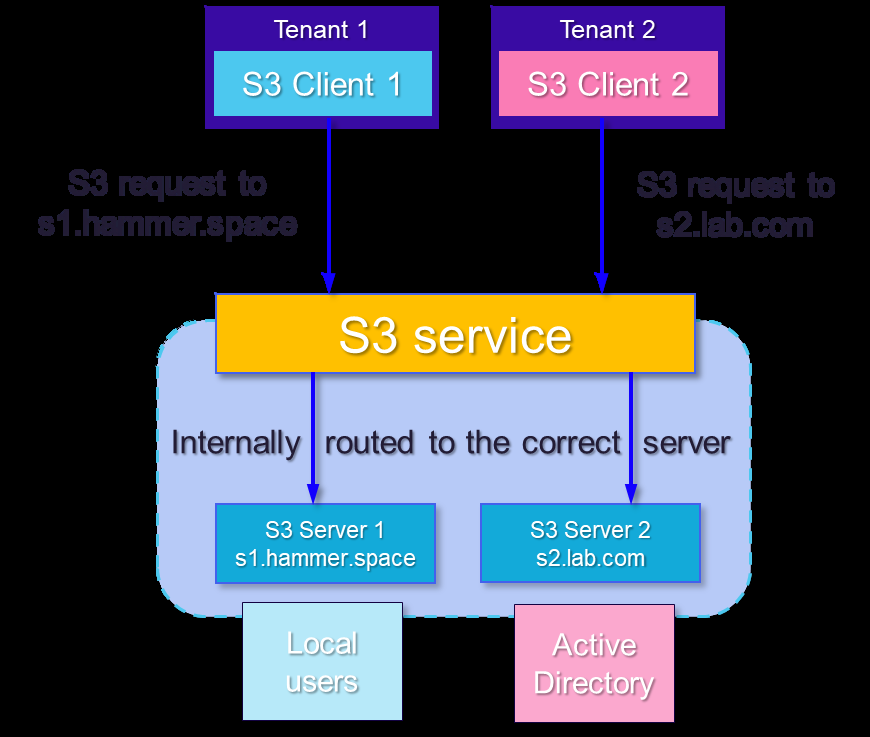
As explained in the next section, even if an S3 client knows or guesses the FQDN of another tenant’s S3 server, it cannot gain access to the data stored there. To prevent unauthorized access, however, it is recommended to use a separate DNS server for each tenant. This way, S3 clients can only resolve the names of S3 servers assigned to their tenant.
S3 Client Authentication
S3 clients are authenticated using access key / secret key pairs, which are independently defined for each S3 server. An access key / secret key pair defined for a client on one S3 server does not provide access to other S3 servers; an S3 client may have access key / secret key pairs on multiple S3 servers if desired.
The authentication source may be independently defined for each S3 server, with options for local users (a user database defined in Hammerspace) or Microsoft Active Directory (AD). Each access key / secret key pair defined for an S3 server is mapped to a user.
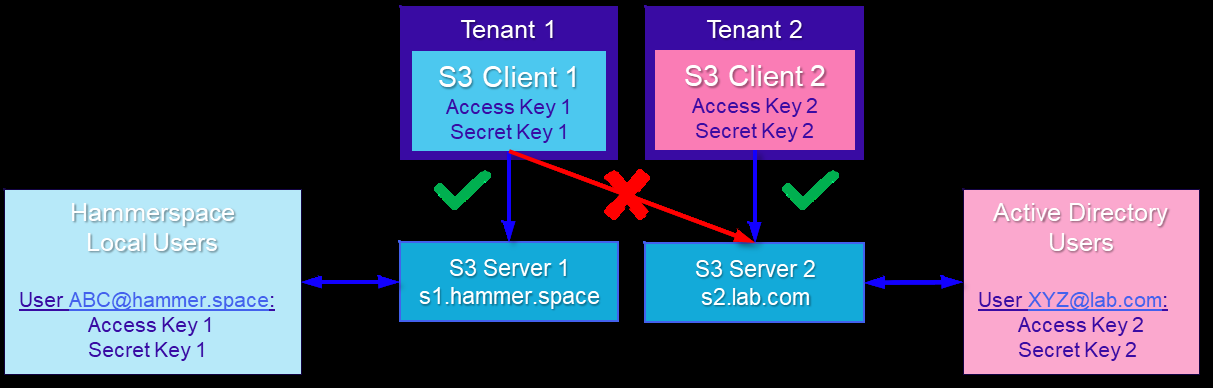
To remove client access to specific S3 resources, the Hammerspace administrator deletes the relevant access key/secret key pairs. To disable a client’s access entirely, such as when an individual leaves the tenant’s organization, the Hammerspace administrator needs only to disable the associated user in AD, or, in the case of local users, delete the local user or delete all of the user’s access key/secret key pairs.
Hammerspace currently supports only a single AD Forest or other grouping of domains that are linked with trust relationships. This simplifies administration by enabling centralized management of user credentials across all tenants.
Traffic Isolation
The usual configuration for Hammerspace S3 (see the diagram in the Architecture section) is to enable the S3 service on every DSX node and use a simple static load balancing mechanism like a round-robin DNS to spread incoming traffic across the DSXs. For this configuration floating IP (FIP) addresses are configured in Hammerspace to maintain connectivity in the event a DSX node fails or is taken out of service. The best practice in this case is to create one DNS 'A' record for each DSX FIP, for each S3 server.
This simple configuration will result in traffic for all S3 servers (and thus all tenants) being spread across all DSX nodes. This is adequate in most cases, but carries a small risk of "noisy neighbor" effects, where a tenant generating unexpectedly high traffic may negatively impact the performance experienced by other tenants.
Assigning specific DSX nodes to particular tenants or groups of tenants can mitigate any noisy neighbor risk. Dedicated DSX nodes can also enable different business models and cost allocation approaches, since it’s clear which tenant is using each DSX.
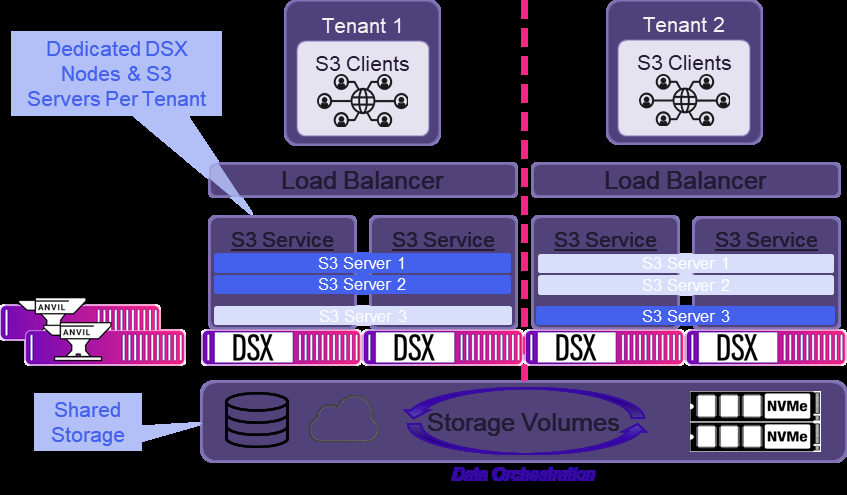
Restricting DSXs to specific tenants requires the use of dynamic load balancing. In this case floating IPs are not used, just the static IPs of the DSX nodes. The load balancer allocates requests for each S3 server’s FQDN across the DSX node IPs assigned to that S3 server. The responsibility to detect an out of service DSX and route requests around it shifts from Hammerspace to the load balancer or other upstream customer infrastructure.
| Even though all S3 servers are still represented on all DSX nodes, the load balancer configuration will restrict requests to specific DSXs. |
Keep in mind that isolating DSXs per tenant results in a less flexible configuration that is more complex to configure and manage. Sharing all DSXs among all tenants is recommended unless isolation is absolutely necessary.
Storage Isolation
Storage for a Hammerspace multitenant S3 implementation can likewise be shared or dedicated. By default all storage volumes are shared by all tenants, and this is the simplest approach. As with sharing DSX nodes, however, sharing storage can lead to noisy neighbor problems. Isolating each tenant to their own pool of storage guarantees per-tenant storage performance, and it also enables the administrator to set per-tenant capacity quotas.
Configuring isolated storage for each tenant involves the configuration of the S3 servers, the structure of the underlying shares, and some objectives.
How Hammerspace Stores Data
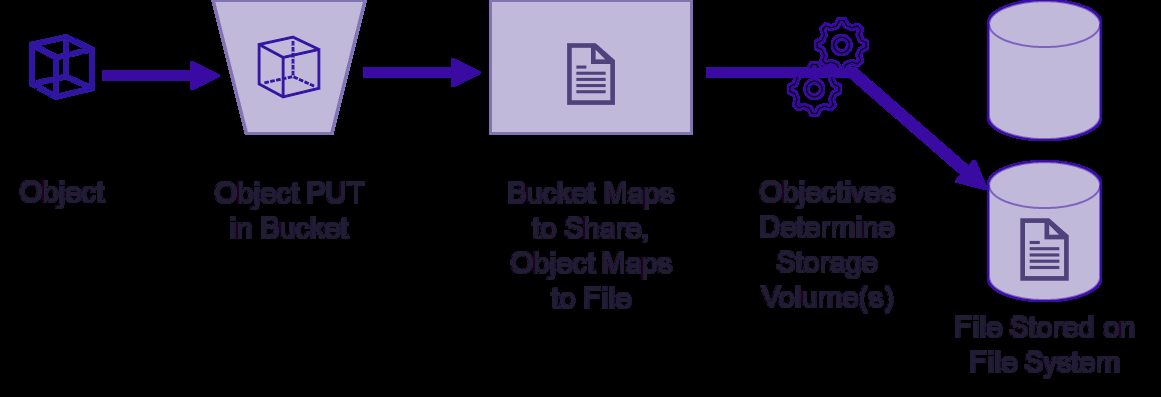
Within Hammerspace, all data is visible and accessible in a unified namespace via any protocol. "File" and "Object" are simply different lenses through which data may be viewed and accessed. All data, regardless of the protocol used to write it into Hammerspace, is ultimately stored as files in a file system.
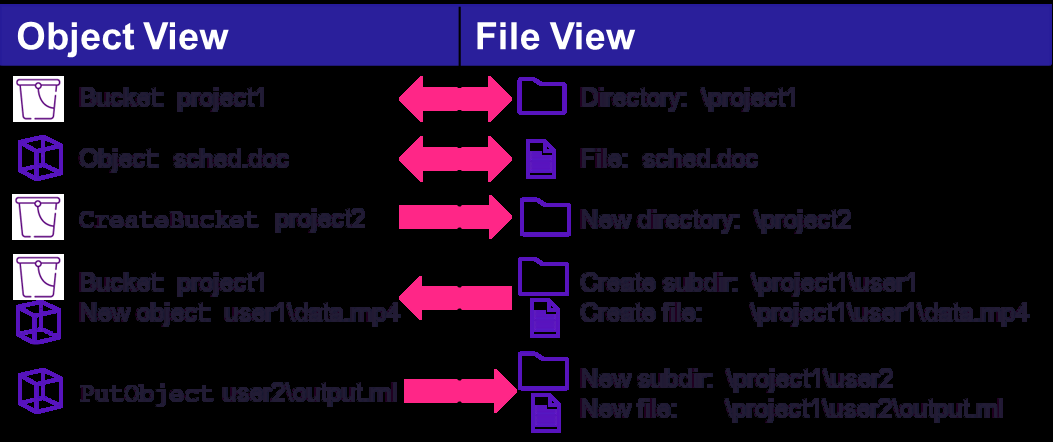
The key to the "dual citizenship" of data across both file and object realms is the principle that one object = one file and vice versa. Each object written via S3 becomes a file in the Hammerspace file system. This is true even for multipart uploads, where the individual object parts are written into a hidden temporary directory and then assembled into a complete file.
Similarly, when an existing share or directory containing files is exposed as an S3 bucket, the files appear as objects with names that reflect the file name, and if located in a subdirectory, the path. Buckets created via S3 become directories in the file system, located at the specified bucket root. Object names with embedded slashes will cause the corresponding directory structure to be created on the file system. The figure below illustrates these concepts.
When an object is stored into a Hammerspace S3 bucket, that object is stored in the corresponding Hammerspace share that was defined at the time the S3 server was created. Like S3 servers, Hammerspace shares are virtual entities. Within the share, each object is stored as a single file on the filesystem of one or more of the underlying Hammerspace storage volumes. The exact storage volume or volumes that house the object data is determined based on the configured Hammerspace objectives.
Isolating a tenant’s data to a specific set of storage hardware, then, involves configuring a Hammerspace share for the tenant’s S3 server(s), and configuring the objectives on that share to place data on the storage volumes representing the tenant’s physical storage devices. The diagram below shows an example configuration using both dedicated DSX nodes and dedicated storage for each tenant.
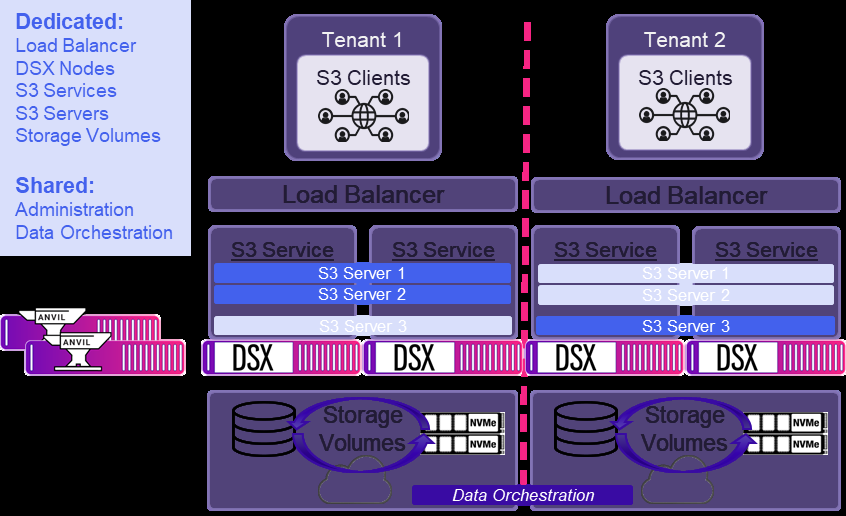
Remember that objectives can also drive more sophisticated data orchestration tasks, such as tiering across storage types, data protection, and more. The principles of isolating tenant storage remain the same, however; objectives control data placement on storage volumes mapped to tenant-specific storage resources.
Storage Capacity Quotas
Hammerspace storage capacity quotas are defined at the share level. A configurable warning threshold triggers an alert to the Hammerspace administrator when it is exceeded. If an S3 client exceeds the configured capacity limit, they will receive either a 507 Insufficient Storage error or a 403 Forbidden error.