Introduction
Managing Infrastructure at Scale
Building a scalable cluster utilizing different storage classes can be complex. Extending this design across multiple sites adds to the complexity. Hammerspace Objectives provides a way to specify where each cluster should place (or provide multiple copies of) data - even between sites or in cloud object storage volumes. With the power of Hammerspace Objectives, you can customize your data’s behavior to match your business workflows, data lifecycle policies, and other needs.
Goal of This Document
This document provides an overview of Hammerspace Objectives and the conditions that determine when they apply.
This document will:
-
Provide an overview of the most commonly used Hammerspace Objectives, including those applied to new shares by default.
-
Provide an overview of the most commonly used Hammerspace Objective conditions, which can be used to control if and when an objective will be applied.
-
Provide multiple, real-life scenarios that translate plain-language requirements into a series of Hammerspace Objectives and conditions.
This document is not meant to be an authoritative source of information on all objectives or conditions, but merely a jumping-off point for configuring Hammerspace to achieve your data management requirements. Consult the Hammerspace documentation for additional information about using the Hammerspace platform.
| Share snapshots are not configured using objectives, and are therefore out of scope for this document. Consult the Hammerspace Administration Guide for information regarding their configuration and use. |
What Are Hammerspace Objectives and Conditions?
Hammerspace Objectives are instructions we use to implement our data orchestration goals and control filesystem behavior.
Conditions are rules that control how objectives are enforced. They can be as broad or as granular as your data orchestration needs require.
To illustrate how an objective works, let’s look at one expressed in the following example.
Tiering Example
Goal: Keep on Tier 1 all recently accessed (< 8hrs) files or .docx files
| Objective | Condition |
|---|---|
place-on-VG-Tier1 |
LAST_USE_AGE ⇐ 8*HOURS |
place-on-VG-Tier1 |
FNMATCH("*.docx",NAME) |
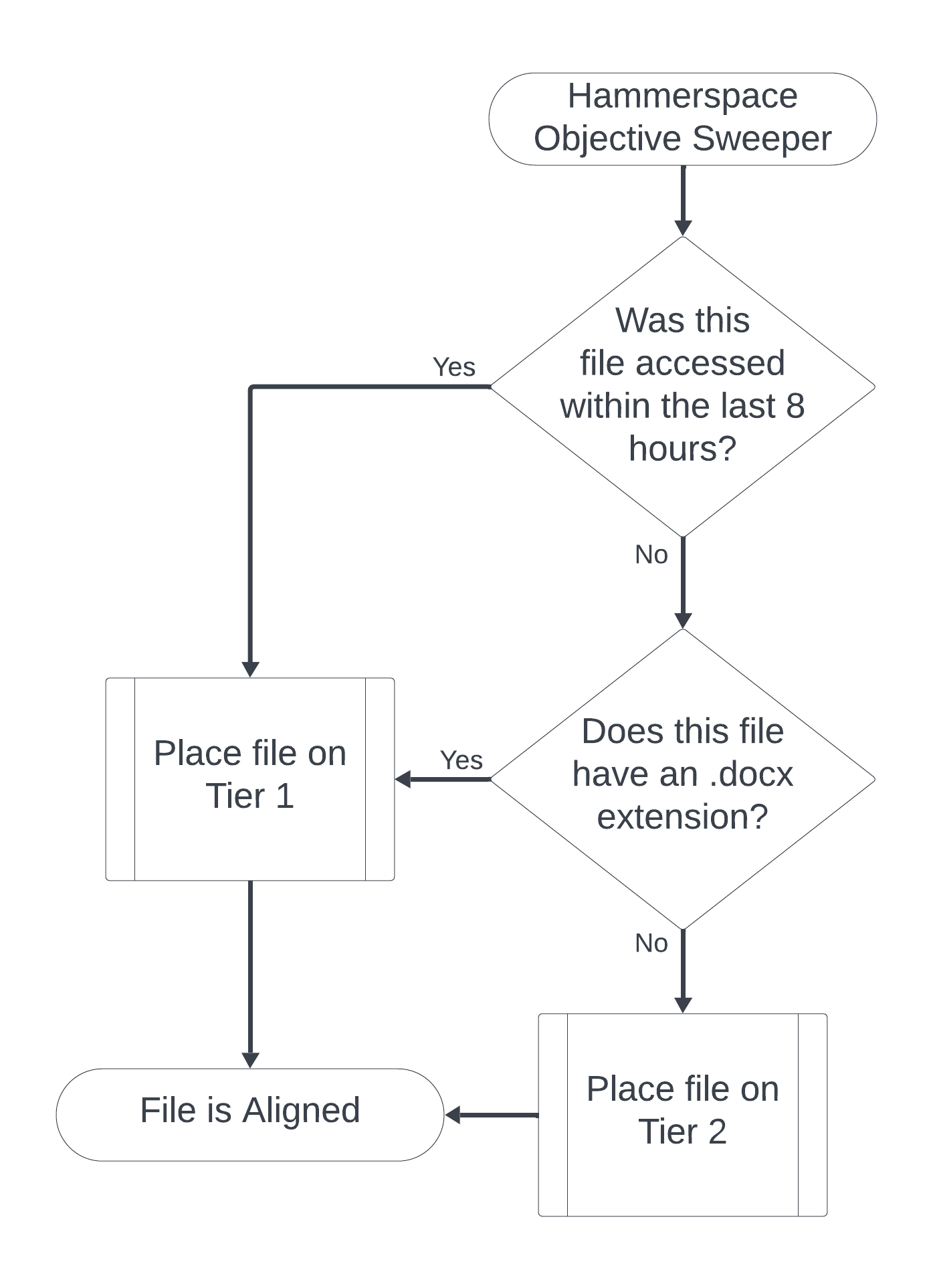
In this example, the Hammerspace Objective Sweeper process checks two conditions and has two possible outcomes. Only one condition needs to be true to place the file on "Tier 1", though you can require both to be true.
Hammerspace Objectives can be broken down into three categories:
-
Storage - The family of placement objectives controls where your data is placed (or not placed) and how many file instances are created.
-
This document discusses these in the Placement Objectives and Data Availability and Protection Objectives sections.
-
-
Data Protection - The versioning, undelete, and file conflict resolution objectives complement snapshots to enhance on-cluster data protection, and enable client self-recovery capabilities.
-
This document discusses these in the Versioning, Undelete, and File Conflict Resolution (Log-Xfer) section.
-
-
Behavior - These objectives control filesystem behavior. Some examples include access-based enumeration, external antivirus integration, filesystem timestamp or ACL behavior, and various NFS/SMB protocol-specific options.
-
This document discusses some of these objectives in the Advanced Objectives section.
-
In the Using Metadata as Objective Conditions section of this document, you will learn how to use conditions to control precisely how objectives are applied. This is an important part of ensuring that your data orchestration goals are met.
In the Objective Scenarios and Solutions section of this document, you will see examples of how Hammerspace architects translate plain-language data orchestration requirements into Hammerspace Objectives and objective conditions.
Key Terms
-
Alignment - Alignment reports whether a file currently adheres to all, some, or none of the currently applied objectives. Alignment is discussed in greater detail in the Aligned, Partially Aligned, and Unaligned section of this document.
-
Aligned - Aligned indicates that all applicable objectives have been met for a file. The share dashboard or the Hammerspace toolkit shows the cumulative measurement of all file alignment statuses.
-
Partially Aligned - Indicates that a file adheres to at least some of the applicable objectives.
-
Unaligned - Indicates that a file does not currently adhere to any of the applicable objectives.
-
-
Condition - Rules used to specify when an objective applies. If no condition is specified, the objective applies to all files.
-
Global file share - A share added to more than one Hammerspace cluster. Each cluster has the same view of the share contents, even if not all files are available at that site.
-
Hammerscript - The proprietary scripting language that underpins Hammerspace Objectives and conditions.
-
Instance - A file placed on Hammerspace will have at least one instance written to the underlying storage - more if the objectives require it.
-
Objective - Rules that define the intent for managing files. This document focuses primarily on using objectives to control data placement.
-
Online file - A file that is considered online when it is in either a DSX volume or a connected NFS storage volume.
-
Offline file - A file that is considered offline when it is only available in an object storage volume.
-
Metadata - Data that provides information about other data. Hammerspace Objectives frequently use file metadata to determine what actions to take. Hammerspace also supports custom file metadata such as keywords, tags, labels, and attributes.
-
Objective sweeper - The objective sweeper process runs continually to evaluate (based on the applied objectives) whether files are still aligned or unaligned and need action.
-
On-demand mobility - In a global file share environment, on-demand mobilities occur if a user opens a file that is not currently stored in an online cluster volume at their site. Both the site that sends the file and the site that requested the file will note the mobility reason as "on-demand".
-
Resilver - The process of remirroring or rebuilding data.
-
Shares - Ordinary file shares clients use to place data on Hammerspace; Hammerspace supports SMB, NFS, and S3 protocols. Objectives ultimately determine what volumes data is ultimately placed on.
-
Site - The terms site and cluster are often used interchangeably, both in this document and within the Hammerspace CLI/GUI; both refer to a specific Hammerspace cluster, which may or may not be at a different physical location away from a separate Hammerspace cluster.
-
Volume - Data placed on shares is written to volumes based on the instructions provided by the share objectives. Volume types include DSX volumes, remote NFS storage volumes, object storage volumes, or even volume groups.
-
Volume groups - Used to group one or more storage systems, volumes, or volume groups so that they can be more easily targeted when configuring share objectives; default objectives will be created for each volume group.
-
Volume threshold - Hammerspace volumes have high and low threshold settings used to control volume utilization; the defaults are 60% (low) and 75% (high). Thresholds can be viewed and edited in the Volume Properties as shown in the following screenshot:

-
High threshold - When a volume high threshold is reached, the cluster will stop placing data and start moving data off until usage falls below the low threshold. If all volumes are at the high threshold, the cluster will continue placing data until all available volumes are filled.
-
Low threshold - When a volume low threshold is reached, the volume becomes a less preferred location to place data. The cluster will, however, continue placing data on the volume until it reaches the high threshold.
Share Default Objectives
The following are default objectives applied to each new share. In most cases, these objectives are left as is and you simply add your objectives. The purpose of these objectives is to define the default behavior for data placed on a Hammerspace cluster. In most cases, you will need to supplement these with your own, or modify them (where possible) to meet your own requirements to ensure that they are not counteracting your own objectives.
| Objective | Condition |
|---|---|
availability-1-nine |
DATA_ORIGIN_LOCAL?ALWAYS |
delegate-on-open |
TRUE |
durability-1-nine** |
DATA_ORIGIN_LOCAL?ALWAYS |
durability-3-nines |
DATA_ORIGIN_LOCAL AND IS_DURABLE |
keep-online |
IS_BEING_CREATED OR HAS_KEEP_ON_THIS_SITE |
keep-online** |
IS_BEING_CREATED OR (HAS_ONLINE_INSTANCE AND IS_RECENTLY_USED)?ALWAYS |
layout-get-on-open |
IS_BEING_CREATED OR HAS_ONLINE_INSTANCE |
log-xfer-1-week |
IS_GFS_SHARE |
optimize-for-capacity |
TRUE |
* This objective cannot be removed*
These default objectives can be broken down into four categories:
-
Keep new or active files in online volumes for a period of time (the two keep-online objectives), then tier them to offline volumes (if present) once that time has elapsed (optimize-for-capacity).
-
Ensure a minimum level of storage protection (durability-1-nine, durability-3-nines, and availability-1-nine).
-
Set the default behavior for clients using the NFSv4.2 protocol (layout-get-on-open and delegate-on-open).
-
Resolve file conflicts in global file shares (log-xfer-1-week). This objective is on every share, but it only takes effect when the share is part of a global file system.
This document defines these objectives in greater detail in the Objective Definitions section, and discusses the conditions in the Using Metadata as Objective Conditions section.
To view the default objectives on a share or edit one, see Default Objectives and Editing an Objective in the Hammerspace Administration Guide.
Client Data Path Architecture
One differentiating feature of Hammerspace is the relationship between the file share and the underlying storage it writes to. A Hammerspace share is, in effect, a virtual endpoint clients use to write data. Where that data is actually written depends on the share objectives, so by simply interacting with a file, the client indirectly influences where the data is placed.
The following diagram illustrates how the client sees their data versus the different ways the data may be placed. In this example, we have three potential volume group destinations, each containing volumes with specific characteristics. Files will ultimately be placed according to the objective configuration, which is constantly being re-evaluated in response to changes in file usage patterns, current date and time, and so on.
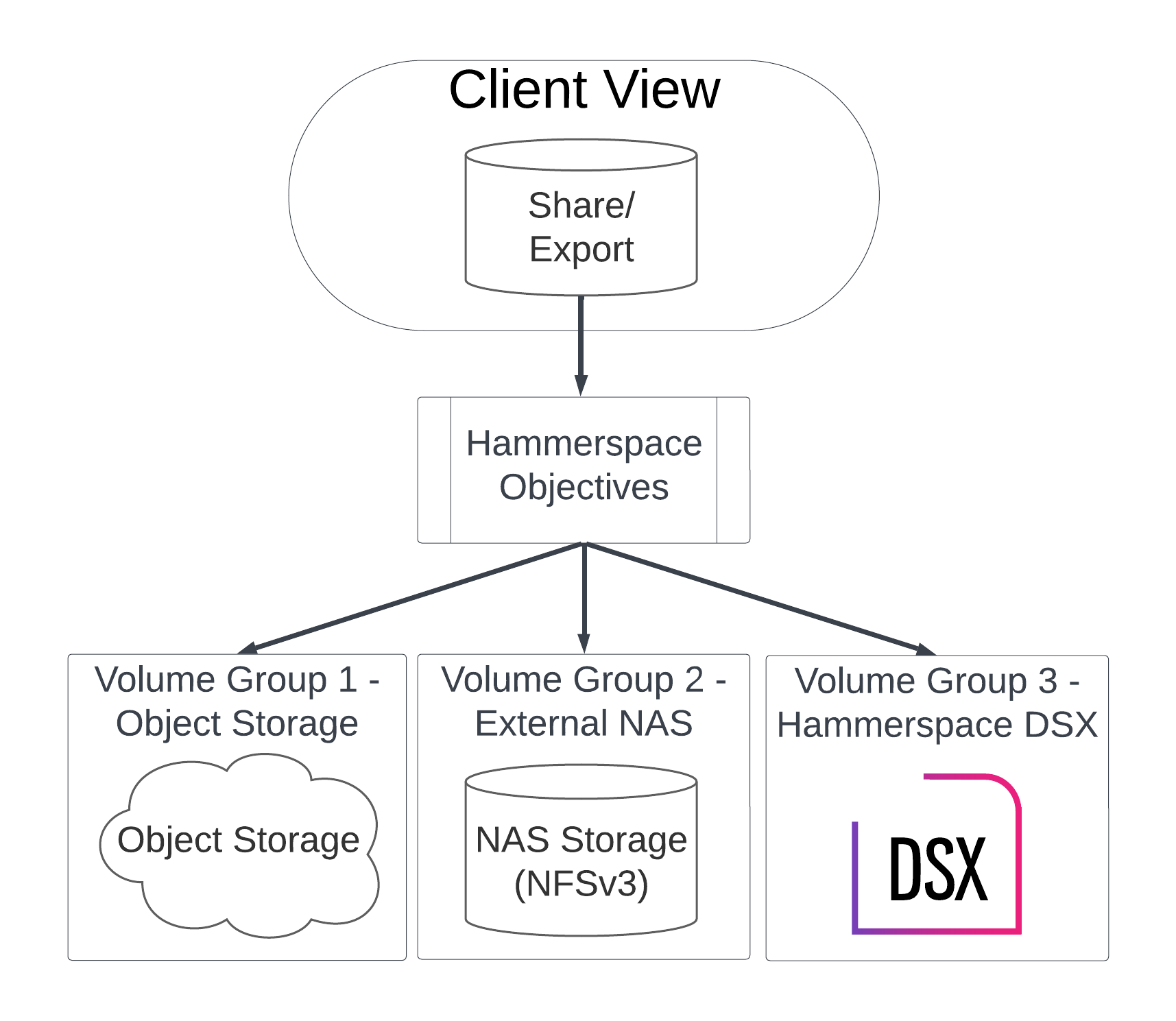
In this diagram, the client sees only the share itself. The client has no visibility into the objectives that control where the data is placed, and has no visibility into the actual volume where the file is located.
| If the only available file instance is in an object storage (offline) volume, Windows users will see it as an offline file, as shown in the following screenshot. |

Applying Objectives
Objectives are applied on a per-share, per-cluster basis. In a global file share environment, each site will need its own objectives defined, and those objectives must be applied to the share at that site.
Best Practice: Always think of objectives on a per-site basis. Each site has different requirements, and the objectives only apply to the site at which they were applied.
You can optionally apply objectives with conditions that control when they are activated. These conditions, written in the Hammerscript, can be based on the action being performed (file being created, file being opened, etc.), the file characteristics (extension, name, etc.), or even the file type (is a snapshot, is a live file, etc.). The Using Metadata as Objective Conditions section of this document will review some of the most common metadata objects that objectives target.
Objectives can also be configured to be overridden by other upstream objectives or removed by users with filesystem write attribute permissions:
-
TRUE - The default setting, which allows the objective to be overridden.
-
ALWAYS - An optional setting that prevents the objective from being overridden. It appears as
?ALWAYSat the end of the condition, as in the share default objectives that cannot be removed.
For the full objective expression syntax, see Advanced Objectives in the Hammerspace Administration Guide.
|
Aligned, Partially Aligned, and Unaligned
In the Key Terms section, we defined Aligned, Partially Aligned, and Unaligned. These terms define whether all, some, or none of the objectives that apply to a given file are currently being met. The Hammerspace GUI and Toolkit can both provide high-level alignment stats measured at the root of the share, as well as stats for individual files.
| Alignment can change at any time, based on many factors ranging from client actions to the current time and date. |
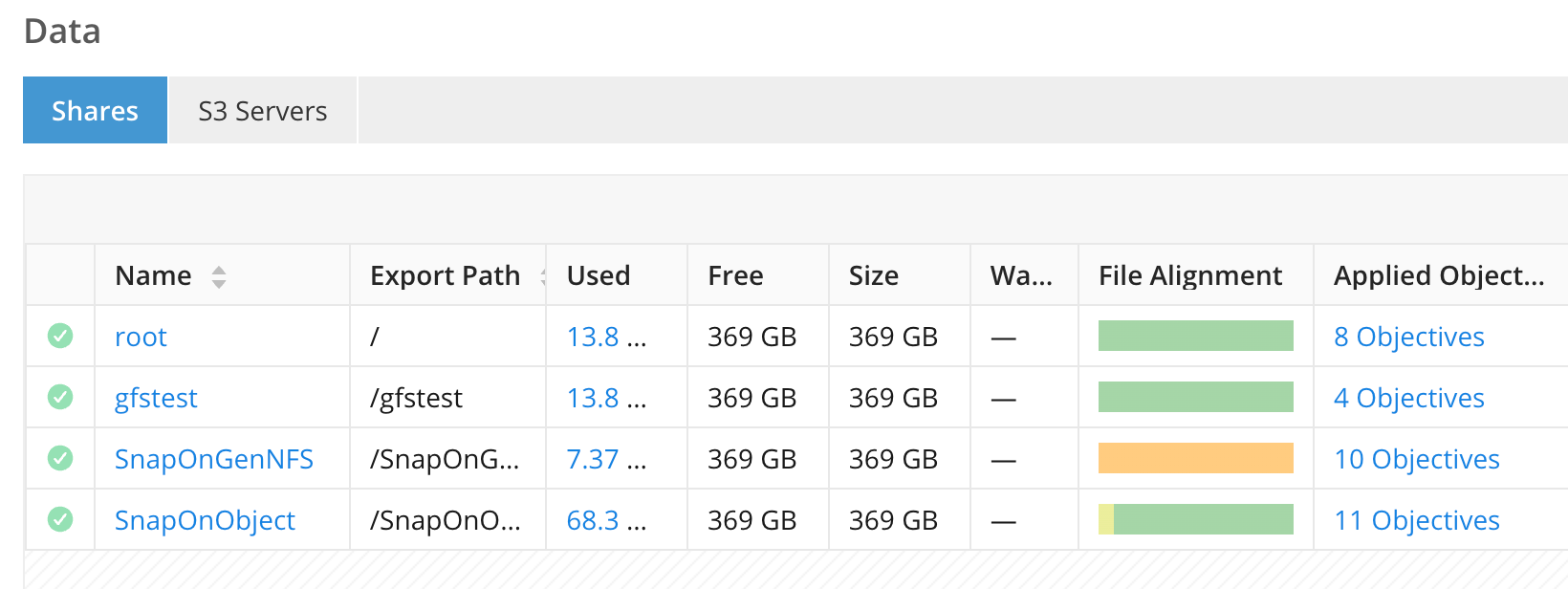
The following screenshot shows the File Alignment status for three different shares. The colored bars reflect alignment at the share level and include green (Aligned), yellow (Partially Aligned), and orange (Unaligned).
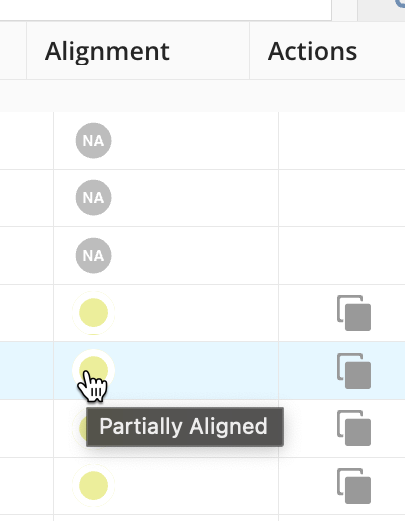
Using the GUI file browser, you can see the status of individual files as shown in the following screenshots:
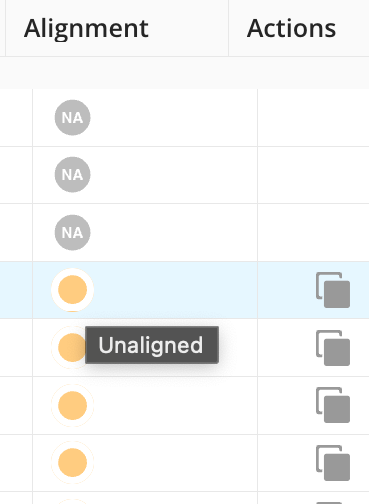
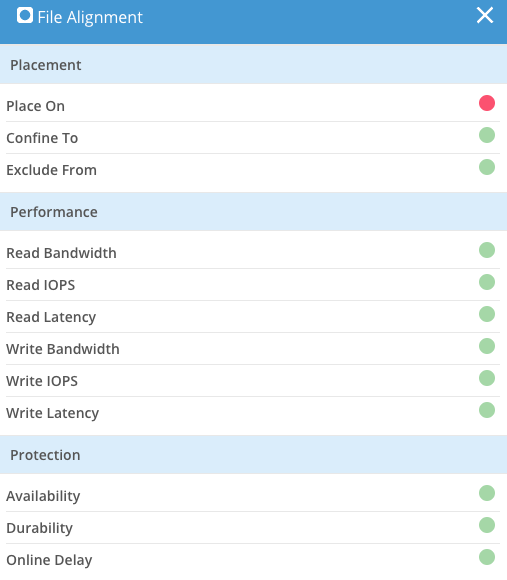
If you click the colored dot, a window opens that shows more detailed information about the alignment status. In the following screenshot, we see that the file aligned is blocked because a place-on action has not yet occurred:
Hammerspace Condition Wizard
When editing a share to apply objectives, the Hammerspace condition wizard helps you write the Hammerscript for optional conditions that control whether an objective is applied. The wizard supports the most common Hammerspace conditions.
The following screenshot shows how to use the condition wizard to build a Hammerscript expression. Select a value from the drop-down menu underneath Step 2: Define conditions. Complete the fields to build the condition (FNMATCH("*.orbit",NAME)?TRUE).
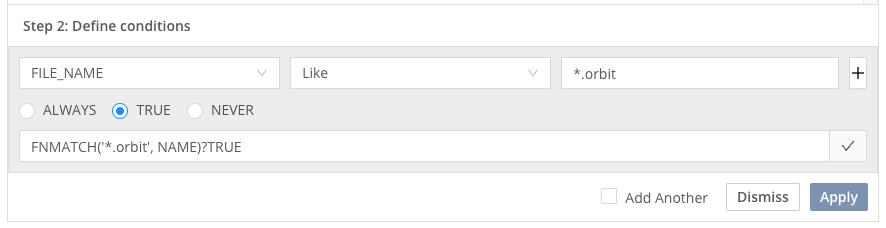
Condition Wizard - Writing Hammerscript
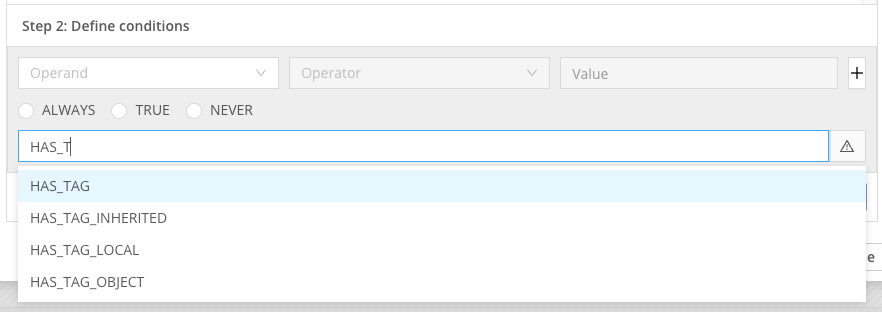
You can search for other possible values, like tags in this case, in the wizard as shown in the example below. To use these condition values, you must understand their syntax, which is defined for many common conditions in the Using Metadata as Objective Conditions section of this document.
For the operators and functions available in objective expressions, see Common Functions for Advanced Expressions and Examples of Advanced Objectives in the Hammerspace Administration Guide.