Objective Scenarios and Solutions
Before deciding which objectives and conditions to use, write down what you want in plain language. Do this for every site, since objectives are created and applied on a per-site basis.
In this section, we will review four common Hammerspace deployments and show how we turn plain-language requirements into Hammerspace Objectives. We will map the plain-language data placement requirements to their actual share objectives in each example. In many cases, you will see that a single objective with multiple conditions satisfies multiple individual data placement requirements.
Scenario #1: One Site - three-Tier NAS
In this scenario, the customer has one site and wants to leverage multiple tiers of local (online) storage and a cloud tier for older data and data recovery. The following diagram shows their proposed Hammerspace infrastructure:
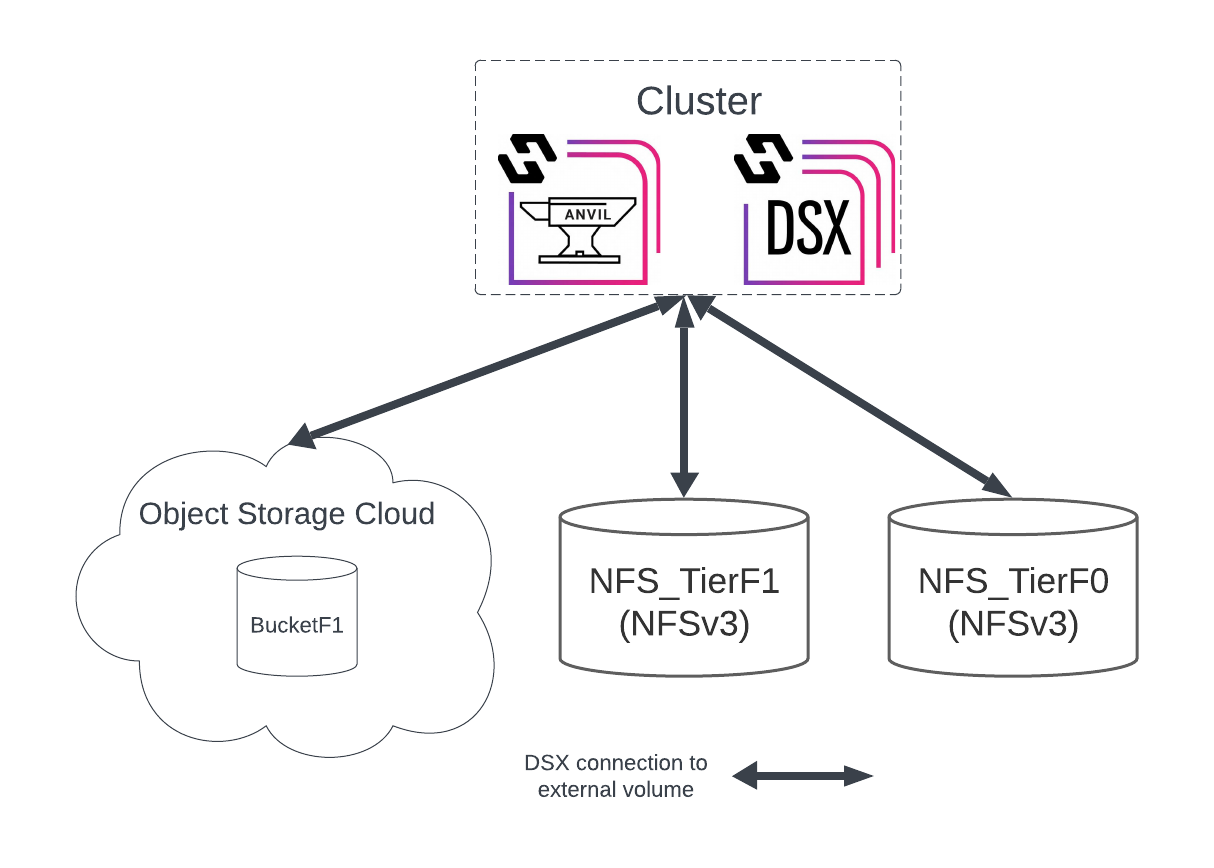
The objective packages are the same for all shares.
Requirements
-
Single cluster
-
3x DSX nodes, no local storage volumes
-
Connected to NFSv3 NVMe volume: NFS_TierF0
-
Connected to NFSv3 SSD volume: NFS_TierF1
-
Connected to object storage: BucketF1
-
-
Data placement and other requirements
-
Data used within the last 14 days is placed on NFS_TierF0
-
Data used within the last 14 to 45 days is placed on NFS_TierF1
-
Data last used more than 45 days ago is placed on BucketF1
-
The most recent snapshot is kept in NFS_TierF1; all other snapshots are moved to BucketF1
-
File versioning enabled, keep for 1 day
-
File undelete enabled, keep for 1 day
-
Key Design and Architecture Takeaways - One Site - three-Tier NAS
-
All data will be stored on external NFSv3 volumes, so the DSX nodes do not require data disks (only boot disks)
-
A special condition is required to target only the latest snapshot, and all snapshots older than that
-
Create volume groups for each storage tier, and add the volumes for that tier to the appropriate group.
Objective Design - All Sites
| Objective | Condition | Meets Requirement |
|---|---|---|
place-on-NFS-TierF0_VG |
IS_LIVE AND LAST_USE_AGE < 14*DAYS |
1 |
place-on-NFS-TierF1_VG |
IS_LIVE AND LAST_USE_AGE >= 14*DAYS AND LAST_USE_AGE ⇐ 45*DAYS |
2 |
place-on-BucketF1_VG |
IS_LIVE AND LAST_USE_AGE > 45*DAYS |
3 |
place-on-NFS-TierF1_VG |
IS_SNAP AND VERSION == 3 |
4 |
place-on-BucketF1_VG |
IS_SNAP AND VERSION > 3 |
4 |
undelete-1-day |
TRUE |
5 |
versioning-1-day |
TRUE |
6 |
|
Scenario #2: Two Sites - Global File Shares
In this scenario, the customer has two similar sites and wants to use a Hammerspace global namespace to extend all shares to both sites. The following diagram shows their proposed Hammerspace infrastructure:
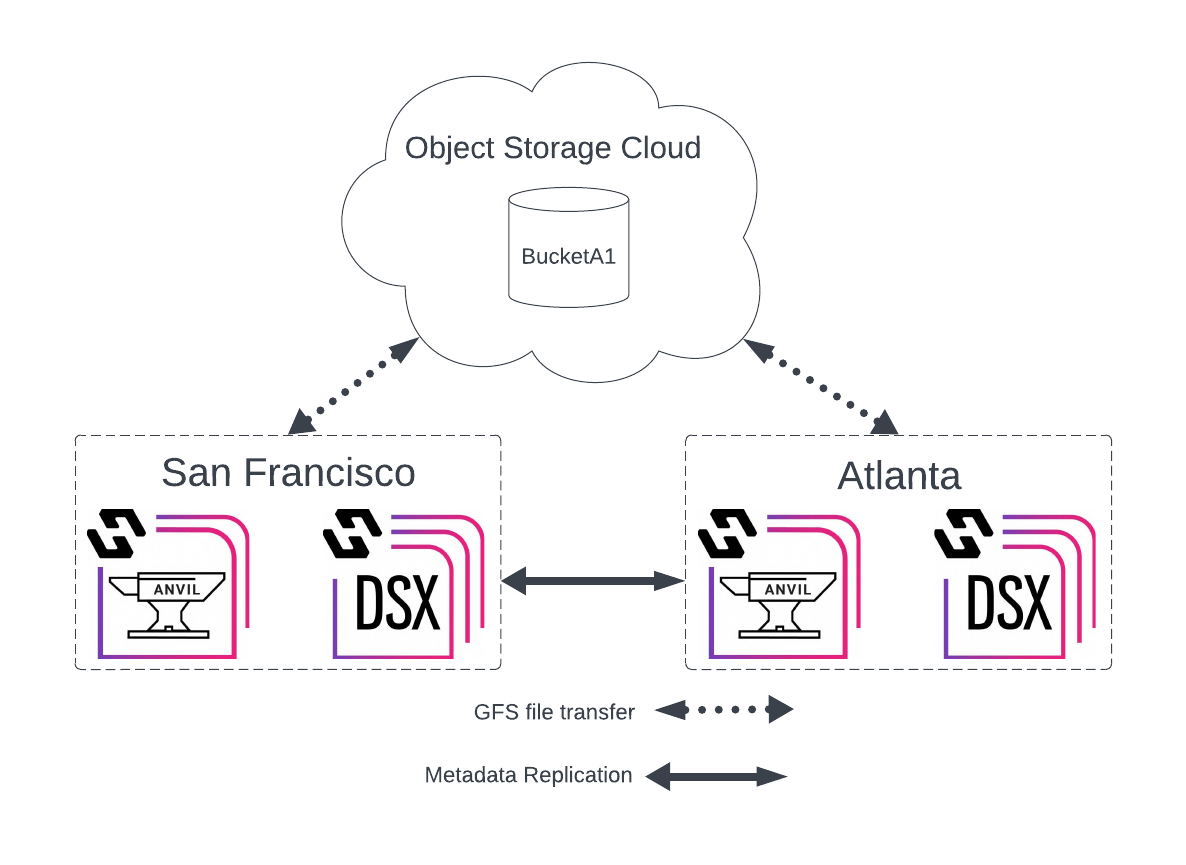
Their cluster designs, share data placement requirements, and objective packages are the same on both sites.
All Sites - Requirements
-
San Francisco site
-
2x DSX nodes, 1 RAIDed volume each
-
Connected to shared object storage: BucketA1
-
-
Atlanta site
-
2x DSX nodes, 1 RAIDed volume each
-
Connected to shared object storage: BucketA1
-
-
Data placement and other requirements (global)
-
Last 30 days of live data kept online
-
All data copied to object storage after 5 minutes for DR purposes
-
Data beyond 30 days tiered to object storage
-
Snapshots placed on object storage
-
Shares are multi-protocol
-
File versioning - kept for 1 day, exclude .work/.WORK files
-
Users must not see files or folders that they don’t have permissions to access
-
-
Objectives
-
All sites/shares
-
Key Design and Architecture Takeaways - Two Sites - Global File Shares
-
The same objectives apply to all sites.
-
Each site has only 1 volume per DSX node, so a simple keep-online objective will be fine for keeping needed files online.
-
Files will be copied to object storage 5 minutes after creation, creating the recommended second instance. This ensures that if a DSX node is unavailable, you can always retrieve the file from object storage.
-
We don’t have to tell an online file to be down-tiered to offline object storage. Since we already have an instance of each file in object storage for DR purposes, the online instance will simply be dropped (removed) when the keep-online objective condition no longer applies.
-
FNMATCH conditions are case sensitive. Verify that it is ok to match only work or WORK. If you need additional variations, such as Work, you will need to expand the supplied condition.
-
Snapshots are enabled on global file shares, so add an objective to ensure all global snapshot data is protected against site failure.
-
All shares are multi-protocol. The ACL-COMPATIBILITY-MODE-NON-POSIX objective will be required.
-
Access-based Enumeration is required to prevent users from seeing files and folders they do not have access to, so we will also need to add the do-not-cache objective.
-
Create volume groups for each storage tier, and add the volumes for that tier to the appropriate group.
Objective Design - All Sites
| Objective | Condition | Meets Requirement |
|---|---|---|
keep-online |
IS_LIVE AND LAST_USE_AGE ⇐ 30*DAYS |
1, 3 |
place-on-BUCKETA1_VG |
(IS_LIVE AND LAST_USE_AGE >= 5*MINUTES) OR IS_SNAP |
2, 4 |
acl-compatibility-mode-non-posix |
TRUE |
5 |
versioning-1-day |
SUM(\{||#A=FNMATCH((\{".work";".WORK"})[ROW],NAME)}[2])==0 |
6 |
access-based-enumeration |
TRUE |
7 |
do-not-cache |
TRUE |
7 |
Best Practice: Files cannot be copied to object storage unless they have been closed for 3 minutes, which is one reason Hammerspace recommends waiting to copy files there. In this document, all examples wait 5 minutes before attempting to copy files to object storage.
Scenario #3: Hub-Spoke Multi-Site - Global File Shares
In this scenario, we have a hub-spoke Hammerspace global file share environment where a hub site keeps all data used in the last year online, while smaller spoke sites keep much less online. Shared object storage volumes are used as an offline tier for files that have not been used for varying amounts of time.
| Hammerspace really doesn’t have the concept of hub-spoke sites. We use that term in this document because it’s assumed the spoke sites are smaller and will likely store less data online. Ultimately, your objectives will determine what each site does with the data in global file shares. |
The following diagram shows their proposed Hammerspace infrastructure:
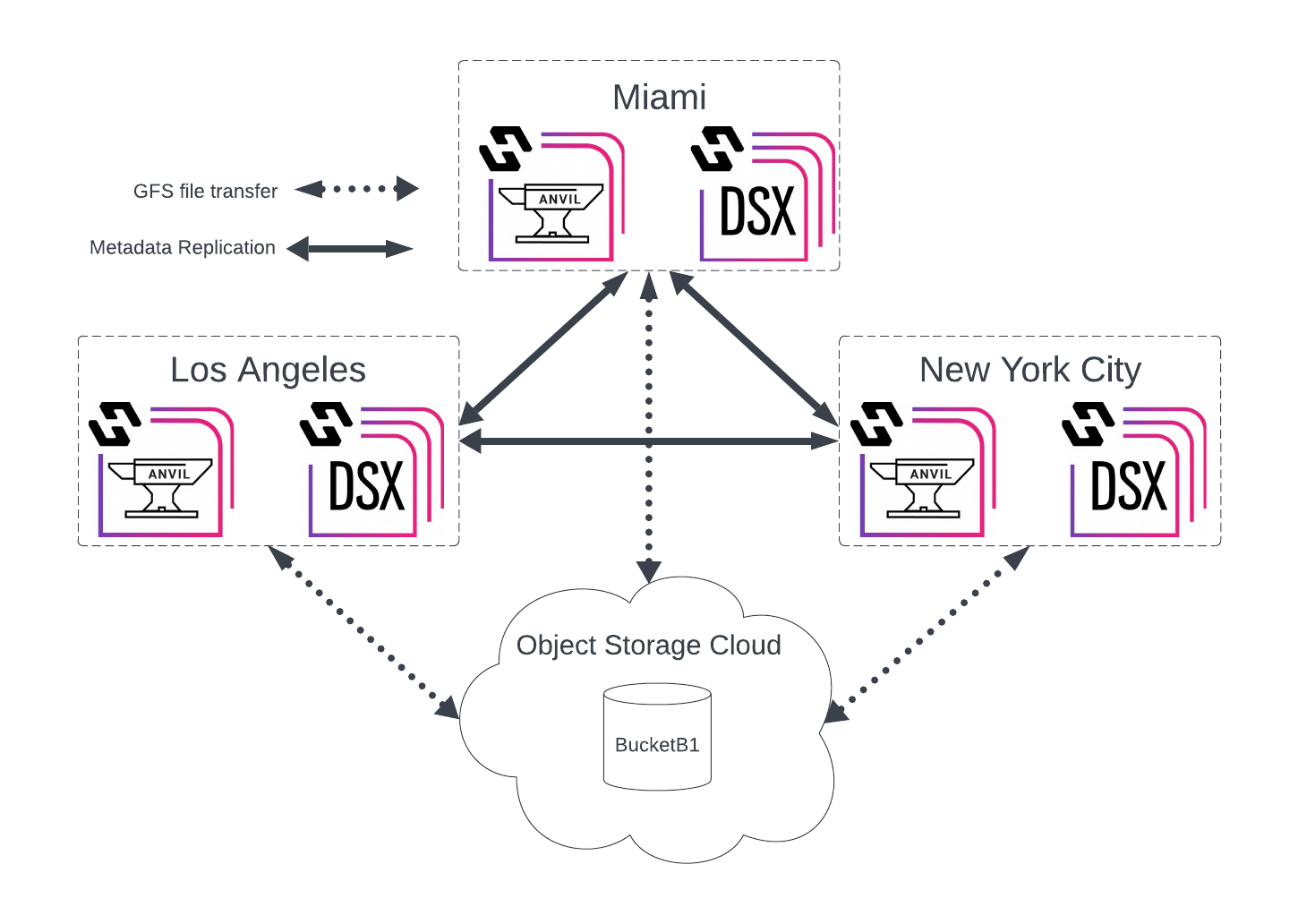
Their cluster designs, data placement requirements, and objective packages are outlined for each site individually.
Primary Site - Los Angeles - Requirements
-
Cluster configuration
-
2x DSX nodes, 1 HDD and 1 SSD RAIDed volume each
-
Connected shared object storage: BucketB1
-
-
Data placement requirements
-
Newly created files are put on a DSX SSD volume
-
Files 4K and smaller must be placed on DSX SSD volume
-
Last 1 year of live data put on DSX HDD volumes
-
All files are written to object storage after 5 minutes of creation/editing
-
Data last used more than 1 year ago stored in object storage only
-
Snapshots placed on object storage
-
File undelete - kept for 1 day - excluding "scratch" folders
-
Key Design and Architecture Takeaways - Los Angeles
-
There are two different types of online storage volumes (hdd and ssd), so you will need to create a volume group for each and place the correct volumes in them.
-
Files will be copied to object storage 5 minutes after creation, creating the recommended second instance. This ensures that if a DSX node is unavailable, you can always retrieve the file from object storage.
-
We don’t have to tell an online file to be down-tiered to offline object storage. Since we already have an instance in object storage for DR purposes, the online instance will simply be dropped (removed) when the keep-online objective condition no longer applies.
-
Snapshots are enabled on global file shares, so add an objective to ensure all global snapshot data is protected against site failure.
-
Create volume groups for each storage tier, and add the volumes for that tier to the appropriate group.
Objective Design - Los Angeles
| Objective | Condition | Meets Requirement |
|---|---|---|
place-on-SSD_VG |
IS_BEING_CREATED OR (IS_LIVE AND SIZE⇐4*KBYTES AND LAST_USE_AGE⇐1*YEARS?TRUE) |
1, 2, 5 |
place-on-HDD_VG |
IS_LIVE AND LAST_USE_AGE ⇐ 1*YEAR |
3, 5 |
place-on-BUCKETA1_VG |
(IS_LIVE AND LAST_USE_AGE >= 5*MINUTES) OR IS_SNAP |
4, 6 |
undelete-1-day |
!FNMATCH("/scratch/",PATH) |
7 |
Spoke Site 1 - New York City - Requirements
-
Cluster configuration
-
2x DSX nodes, 1 volume each
-
Connected shared object storage: BucketB1
-
-
Data placement requirements
-
Files created, opened, or saved by local users are kept online for 60 days
-
Files/folders with "NYC" label are kept online, excluding folders named "temp"
-
Data last used more than 60 days ago is stored in object storage only
-
All data copied to object storage after 1 hour for DR purposes
-
Snapshots placed on object storage
-
Key Design and Architecture Takeaways - New York City
-
Although it will only be used on this site, create the NYC label on all sites, and verify the label’s internal ID matches across all sites.
-
NYC will only be copying files to object storage after 1 hour has passed, versus 5 minutes in LA. This is OK, but note that the Recovery Point Objective (RPO) will differ by site. Consider changing it to 5 minutes so that all sites have a similar RPO.
-
We don’t have to tell an online file to be down-tiered to offline object storage. Since we already have an instance in object storage for DR purposes, the online instance will simply be dropped (removed) when the keep-online objective condition no longer applies.
-
Snapshots are enabled on global file shares, so add an objective to ensure all global snapshot data is protected against site failure.
-
FNMATCH conditions are case sensitive; verify that it is ok to match only temp (lowercase), else add additional match conditions.
Objective Design - New York City
| Objective | Condition | Meets Requirement |
|---|---|---|
keep-online |
IS_LIVE AND HAS_LABEL(LABEL('NYC')) AND !FNMATCH("/temp/",PATH) |
2 |
keep-online |
IS_LIVE AND LAST_USE_AGE ⇐ 60*DAYS AND (HAS_ONLINE_INSTANCE OR DATA_ORIGIN_LOCAL) |
1, 3 |
place-on-BUCKETB1_VG |
(IS_LIVE AND LAST_USE_AGE >= 1*HOURS) OR IS_SNAP |
4, 5 |
Spoke Site 2 - Miami - Requirements
-
Cluster configuration
-
2x DSX nodes, 1 RAIDed volume each
-
Connected shared object storage: BucketB1
-
-
Data placement requirements
-
Files created/used by local users are kept online for 1 month
-
Files/folders with "MIA" label are kept online, excluding files with
.tmp/.TMPextension -
All data copied to object storage after 1 hour for DR purposes
-
Snapshots placed on object storage
-
Key Design and Architecture Takeaways - Miami
-
There is a requirement to keep files local once this site uses them, so we will need to use a combination of HAS_ONLINE_INSTANCE OR DATA_ORIGIN_LOCAL.
-
Although it will only be used on this site, create the MIA label on all sites, and verify that the label’s internal ID matches across all sites.
-
MIA will only copy files to object storage after 1 hour has passed, versus 5 minutes in LA. This is OK, but note that the Recovery Point Objective (RPO) will differ by site. Consider changing it to 5 minutes so that all sites have a similar RPO.
-
We don’t have to tell an online file to be down-tiered to offline object storage. Since we already have an instance in object storage for DR purposes, the online instance will simply be dropped (removed) when the keep-online objective condition no longer applies.
-
Snapshots are enabled on global file shares, so add an objective to ensure all global snapshot data is protected against site failure.
-
FNMATCH conditions are case sensitive; verify that it is OK to match only TMP or tmp, or add additional match conditions.
-
Create volume groups for each storage tier, and add the volumes for that tier to the appropriate group.
Objective Design - Miami
| Objective | Condition | Meets Requirement |
|---|---|---|
keep-online |
IS_LIVE AND HAS_LABEL(LABEL('MIA')) AND SUM(\{||#A=FNMATCH((\{".tmp";".TMP"})[ROW],NAME)}[2])==0 |
2 |
keep-online |
IS_LIVE AND LAST_USE_AGE ⇐ 1*MONTHS AND (HAS_ONLINE_INSTANCE OR DATA_ORIGIN_LOCAL) |
1 |
place-on-BUCKETB1_VG |
(IS_LIVE AND LAST_USE_AGE >= 1*HOURS) OR IS_SNAP |
3, 4 |
Scenario #4: Mesh Multi-Site - Global File Shares
In this design scenario, we have a multi-site Hammerspace global file share environment where each site has unique data-availability requirements, and each cluster has multiple disk classes for online storage. Shared object storage volumes are used as an offline tier for files that have not been used for varying amounts of time.
The following diagram shows their proposed Hammerspace infrastructure:
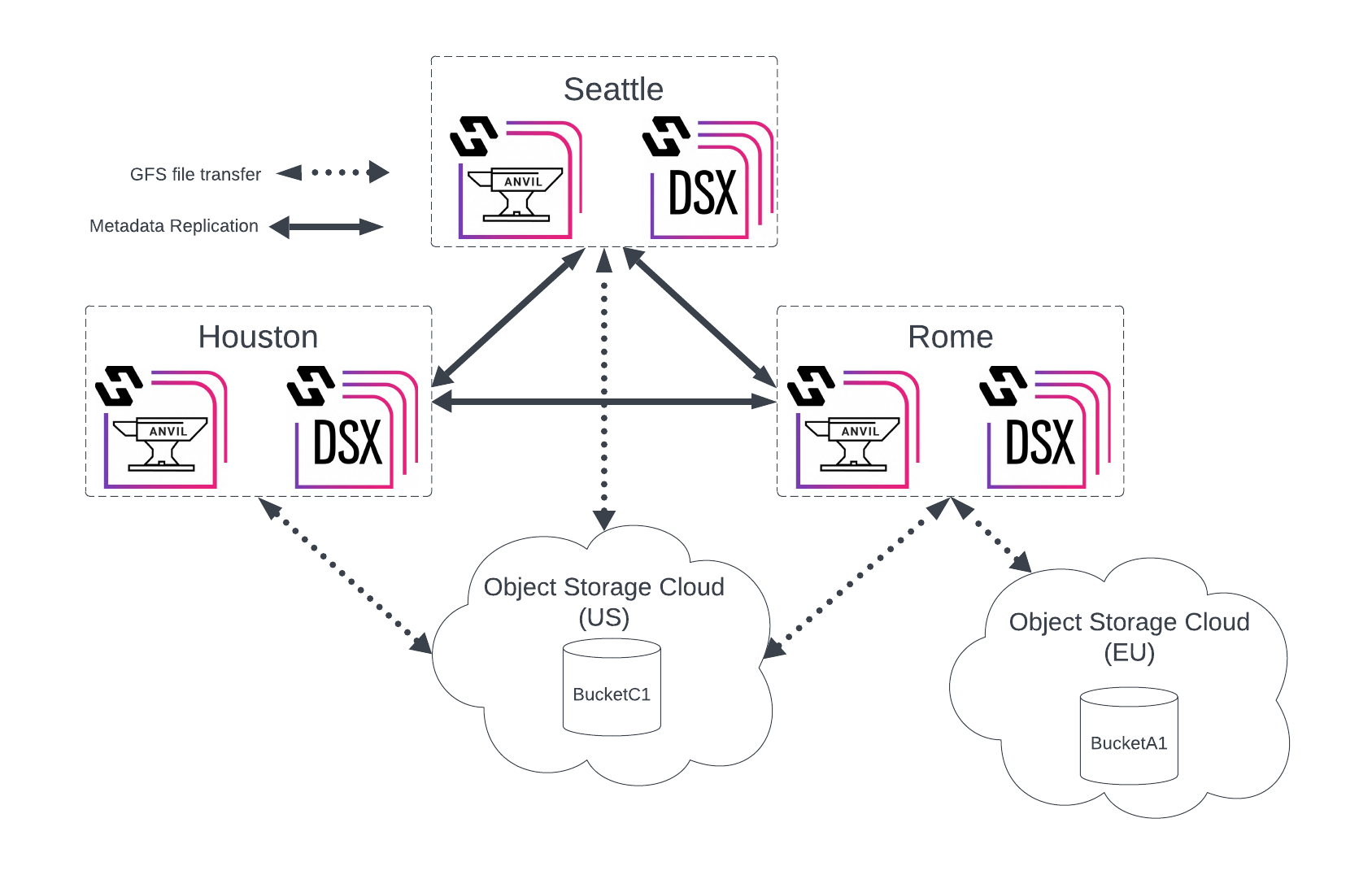
Their cluster designs, data placement requirements, and objective packages are outlined for each site individually.
Mesh Site 1 - Seattle - Requirements
-
Cluster configuration
-
2x DSX nodes, 1 HDD and 1 SSD RAIDed volume each
-
Connected shared object storage: US-BucketC1
-
-
Data placement requirements
-
Last 6 months used live files with *.mov and *.png extensions should be placed on DSX HDD volume
-
Last 6 months used live files (excluding *.mov and *.png) should be placed on DSX SSD volumes
-
All files are written to object storage after 5 minutes of creation/editing
-
Data beyond 6 months is stored in object storage only
-
Snapshots placed on object storage
-
Key Design and Architecture Takeaways - Seattle
-
There are two different types of online storage volumes (hdd and ssd), so you will need to create a volume group for each and place the correct volumes in them.
-
Since certain file types will only be placed on a specific volume type, ensure those same files are not stored on the other volume type.
-
FNMATCH conditions are case-sensitive; verify that it is ok to match only png and mov (lowercase), else add additional match conditions.
-
Files will be copied to object storage 5 minutes after creation, creating the recommended second instance. This ensures that if a DSX node is unavailable, the file can always be retrieved from object storage.
-
We don’t have to tell an online file to be down-tiered to offline object storage. Since we already have an instance in object storage for DR purposes, the online instance will simply be dropped (removed) when the keep-online objective condition no longer applies.
-
Snapshots are enabled on global file shares, so add an objective to ensure all global snapshot data is protected against site failure.
Objective Design - Seattle
| Objective | Condition | Meets Requirement |
|---|---|---|
place-on-HDD_VG |
IS_LIVE AND LAST_USE_AGE ⇐ 6*MONTHS AND, SUM(\{||#A=FNMATCH((\{".mov";".png"})[ROW],NAME)}[2])==1 |
1, 4 |
place-on-SSD_VG |
IS_LIVE AND LAST_USE_AGE ⇐ 6*MONTHS AND SUM(\{||#A=FNMATCH((\{".mov";".png"})[ROW],NAME)}[2])==0 |
2, 4 |
place-on-US-BUCKETC1_VG |
(IS_LIVE AND LAST_USE_AGE >= 5*MINUTES) OR IS_SNAP |
3, 5 |
Mesh Site 2 - Houston - Requirements
-
Cluster configuration
-
3x DSX nodes, 1 HDD and 1 SSD volume each
-
DSX volumes are on standalone, non-RAIDED drives
-
-
Connected shared object storage: US-BucketC1
-
-
Data placement requirements
-
Last 4 months of live data put on DSX HDD volumes
-
Newly created files should be placed on DSX SSD volumes
-
Data beyond 4 months stored in object storage only
-
Snapshots placed on object storage
-
Key Design and Architecture Takeaways - Houston
-
There are two different types of online storage volumes (hdd and ssd), so you will need to create a volume group for each and place the correct volumes in them.
-
Unlike Seattle, there is no listed requirement to write all files to object storage. Per Hammerspace best practices, and to support continuity in the event of a site failure, add this objective to every site that hosts global file shares.
-
Since we write all data to object storage for DR purposes, there is less urgency to protect against the failure of the non-RAIDED HDD and SSD volumes. If, for some reason, writing all data to object storage isn’t practical, we should consider adding an availability-3-nines objective to each share so files are written to two different DSX nodes (each node is a failure domain, not each volume).
-
We don’t have to tell an online file to be down-tiered to offline object storage. Since we decided to place an instance in object storage for DR purposes, the online instance will be dropped (removed) when the keep-online objective no longer applies.
-
Snapshots are enabled on global file shares. Add an objective to ensure all global snapshot data is protected against site failure.
-
Create volume groups for each storage tier, and add the volumes for that tier to the appropriate group.
Objective Design - Houston
| Objective | Condition | Meets Requirement |
|---|---|---|
place-on-HDD_VG |
IS_LIVE AND LAST_USE_AGE ⇐ 4*MONTHS |
1, 3 |
place-on-SSD_VG |
IS_BEING_CREATED |
2 |
place-on-US-BUCKETC1_VG |
(IS_LIVE AND LAST_USE_AGE >= 5*MINUTES) OR IS_SNAP |
4, DR best practice |
Mesh Site 3 - Rome - Requirements
-
Cluster configuration
-
2x DSX nodes, 1 HDD and 1 SSD RAIDed volume each
-
Connected shared object storage: US-BucketC1
-
Connected non-shared object storage: EU-BucketA1
-
-
Data placement requirements
-
Last 1 month’s used live data put on DSX HDD volumes
-
Newly created files should be placed on DSX SSD volumes
-
All files are written to the appropriate object storage after 15 minutes of creation/editing
-
Data on the standalone Rome_HR share should have extra precautions to ensure it isn’t written to US-BucketC1; instead, use EU-BucketA1.
-
Data beyond 1 month should be stored in object storage only
-
Snapshots placed on object storage
-
Key Design and Architecture Takeaways - Rome
-
There are two different types of online storage volumes (hdd and ssd), so you will need to create a volume group for each and place the correct volumes in them.
-
For all shares but the Rome_HR share, we don’t have to tell an online file to be down-tiered to offline object storage. Since we decided to place an instance in object storage for DR purposes, the online instance will be dropped (removed) when the keep-online objective no longer applies.
-
For the Rome_HR share, we need to take every precaution available to ensure files are not written to US-based object storage volumes.
-
Snapshots are enabled on global file shares, so even though it is not mentioned, add an objective to ensure all global snapshot data is protected against site failure.
-
While not an objective, note that the Rome_HR share is not a global file share, so snapshots for this share will need to be enabled on the Rome site directly.
-
Create volume groups for each storage tier, and add the volumes for that tier to the appropriate group.
Objective Design - Rome
| Objective | Condition | Meets Requirement |
|---|---|---|
place-on-SSD_VG |
IS_BEING_CREATED |
2 |
place-on-HDD_VG |
IS_LIVE AND LAST_USE_AGE ⇐ 1*MONTHS |
1, 5 |
place-on-US-BUCKETC1_VG |
(IS_LIVE AND LAST_USE_AGE >= 15*MINUTES) OR IS_SNAP |
3, 6 |
confine-to-SSD_VG** |
IS_BEING_CREATED |
2, 4 |
confine-to-HDD_VG** |
IS_LIVE AND LAST_USE_AGE ⇐ 1*MONTHS |
1, 4, 5 |
confine-to-EU-BUCKETA1_VG** |
(IS_LIVE AND LAST_USE_AGE >= 15*MINUTES) OR IS_SNAP |
3, 4, 6 |
exclude-from-US-BUCKETC1_VG** |
N/A |
4 |
* Objectives apply to Rome_HR share only*