What Is Tier 0?
Tier 0 means making use of otherwise stranded or inefficiently used storage devices in compute nodes (including GPU and CPU based compute nodes). The name is taken from the idea that storage systems outside of the GPU nodes make up traditional tiers, starting with tier 1. Tier 0 is simply the tier closest to the compute node - right inside it.
There are multiple ways these devices can be put to work, increasing efficiency in multiple dimensions which may include simply using the space, through making the whole AI job more efficient by putting data used by the GPU nodes running the job on the nodes actually doing the work.
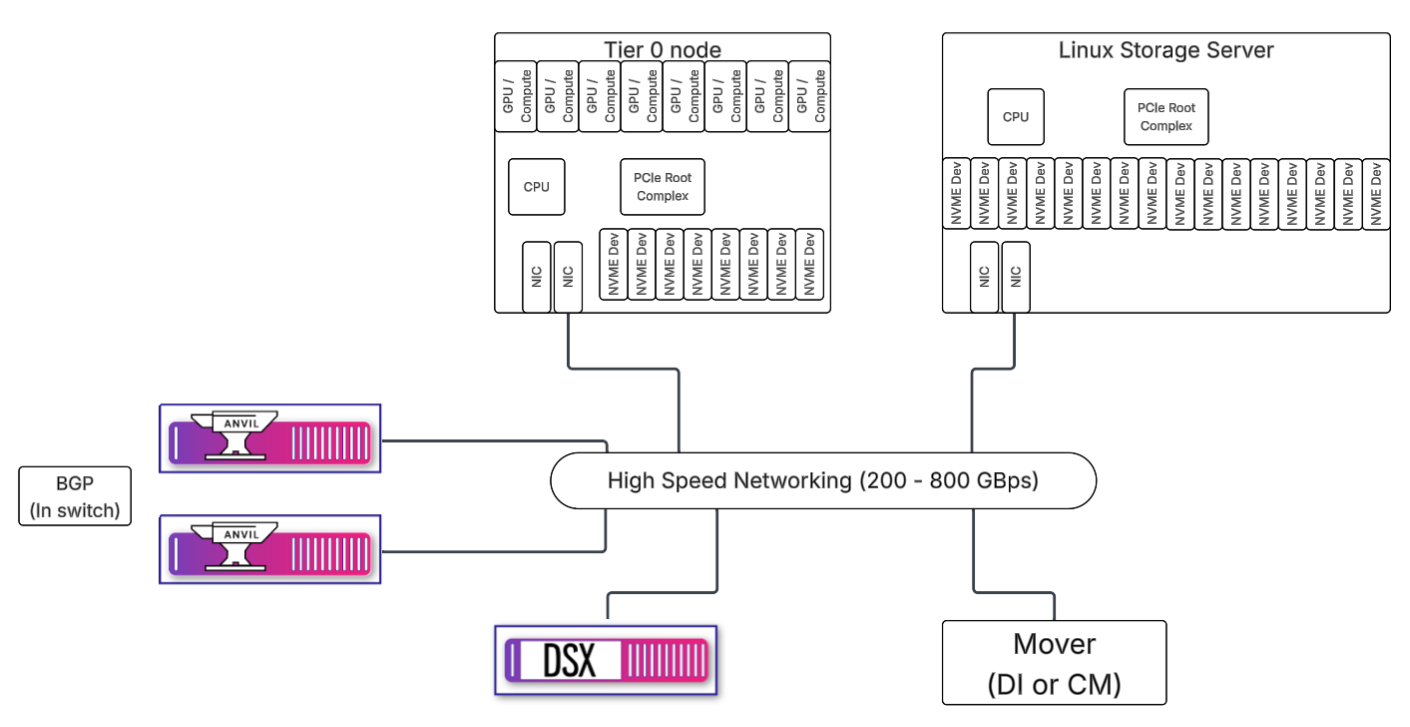
It’s important to understand the distinction between Tier 0 nodes and Linux Storage Server (LSS) nodes. Tier 0 nodes include the compute function such as GPUs. The only storage service they provide is exporting (NFS term for sharing) a number of internal storage devices as file systems managed by Hammerspace, but consumed by Tier 0 compute nodes. GPU nodes are usually sold in a specific server configuration including a set of internal storage devices, usually NVME, and run an operating system dictated by the GPU vendor or systems integrator. For example, Nvidia based platforms typically require Ubuntu as the operating system on the GPU nodes, which is fully supported by Hammerspace.
LSS nodes are more flexible in terms of both configuration and operating system choice. Customers can select the server vendor, model, and configuration of their choice, provided it meets the requirements. Hammerspace offers some predefined configurations referred to as "ready nodes" as one option for LSS. While several supported options exist for operating systems, Hammerspace recommends RHEL-based distributions based on 9.5 including Rocky 9.5. However, since NFS is an open standard and built into all Linux kernels, we do not limit to 9.5. Customers should consult with their Hammerspace technical team to verify any compatibility, feature support, or other issues.
LSS nodes can provide the following services:
-
Storage volumes
-
Data Mover
-
NFS mover, also known as Data Instantiator (DI)
-
Cloud Mover (CM), which supports any S3-compatible cloud or object storage
-
-
Hammerspace S3 services
-
Quorum services for Anvil nodes
Some customers have Tier 0 as the first tier, and LSS as the second, which they may call Tier 1. Others have third-party enterprise storage as Tier 1. You might have LSS as the first tier of storage, and not use any of the storage in GPU nodes as Hammerspace managed volumes. Although that technically isn’t Tier 0, it is an architecture used by some large Hammerspace customers, and the storage configuration of the LSS is essentially similar to how it would be done on Tier 0 nodes.
Goal of This Document
The purpose of this document is to outline the setup, configuration, and management of Hammerspace Tier 0.
This document will:
-
Provide an overview of solution architecture, including components, their relationships, and connections
-
Provide an overview of how to configure Tier 0 and Linux Storage Server nodes, add them to a Hammerspace cluster both as servers and as clients
-
Provide an overview of how to install, configure, and connect an NFS mover
-
Provide some example objectives for data placement