Where Preserved File Copies Are Stored
Applies to: Hammerspace 5.2 and later.
Several Hammerspace features keep extra copies of files so they can be recovered: share snapshots, and the versioning, undelete, and log-xfer objectives. Two questions come up often about the copies they leave behind.
Which Volume Do the Copies Land On?
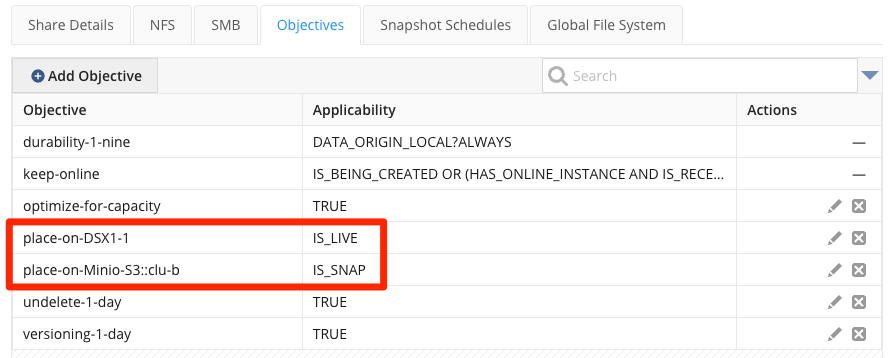
They follow the share’s place-on objectives. Without one, they can be written to any writable volume:
- No
place-onobjective -
Every file in the share, live or preserved, can land on any writable volume.
place-on-<volume>, conditionnone-
Every file in the share is placed on the named volume.
place-on-<volume>, conditionis_snap-
Only snapshot, versioning, undelete, and log-xfer copies go to the named volume.
place-on-<volume>, conditionis_live-
Only live files go to the named volume. Preserved copies land on any writable volume unless another objective places them somewhere specific.
Do the Copies Count Against a Share Quota?
No. Only live files count against a share quota. Preserved copies still consume space on the underlying storage volume, but that space is not counted against the quota.
This is why a share’s live file system and its underlying storage can report very different numbers. In the example below the live file system is using 2.98 MB:

While the share’s Capacity tab shows 5.13 GB consumed on the underlying volumes, because several large files were deleted from the live file system and are still being retained by snapshots or an undelete objective:
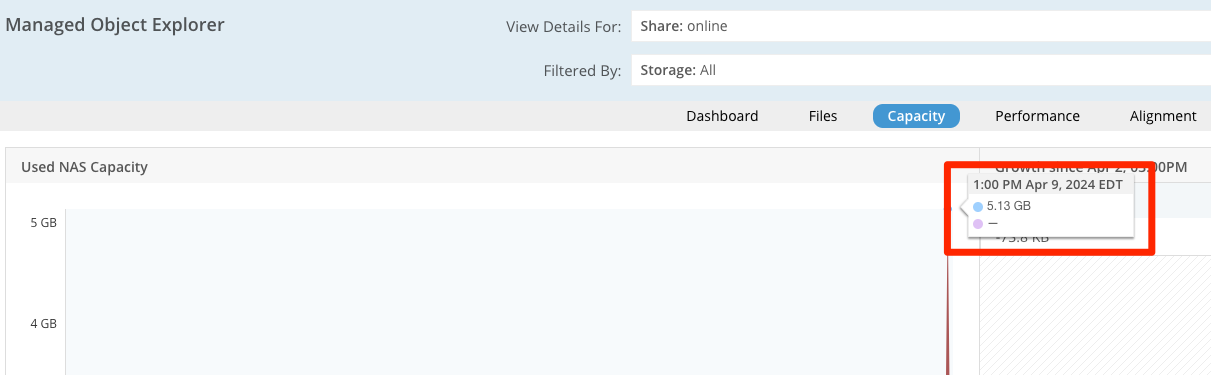
Once the snapshots expire or the undelete retention period passes, that space is released.
| Files on object storage volumes may be deduplicated, compressed, or both, so the physical space used there is often less than the logical size of the files. |