Kerberos Support for NFS
Hammerspace supports using Kerberos as a frontend-only security enhancement for NFSv3 and NFSv4.1 and later shares. With a correctly configured Active Directory (AD), Hammerspace shares can be configured with Kerberos security options.
Limitations
-
Mounting of shares using IP addresses is not supported.
Although it still WORKS in some circumstances, the mount is not kerberized. This may be because the client needs an SPN to request a Kerberos ticket from the KDC. With an IP address, the SPN it builds (nfs/<ip>) is unlikely to match a real entry in the KDC. If the SPN doesn’t match an entry in the KDC, Kerberos auth will fail. -
Currently, Hammerspace only supports Microsoft Active Directory Key Distribution Centers (KDCs).
-
Kerberos connections only work with the shares as exposed by the data portals. As such, the data-portal feature will not work with NFS version 4.2.
-
Kerberos is a frontend-only security enhancement and is not global. Thus, no communication between the data portal and the Anvil (and all other storage nodes) uses Kerberos.
NFS Protocol Support
NFS Version and Security Modes:
-
Kerberos security enhancements for Hammerspace shares work best with NFSv4.1 via data portals.
-
NFS 4.1 data portals are recommended for Kerberos and may not be enabled by default. You can enable data portals with NFSv4.1 using dp-update --enable followed by one of the following parameters: [
--data-portal-id, --node-name, or --data-portal-type]. For more information, use dp-update --help -
While NFSv3 can be used with Kerberos, the full security benefits are only realized with NFSv4 or later deployments. However, it is important to note that data portals will not work with NFS4.2.
-
-
When Kerberos is enabled, export rules for shares must specify one of the following security methods: krb5 (Kerberos V5 authentication), krb5i (Kerberos V5 authentication with integrity checking using checksums), or krb5p (Kerberos V5 authentication with privacy service).
Active Directory Configuration Requirements
Many Kerberos integration problems encountered in the field are due to misconfigurations of Active Directory. Setting up an Active Directory to use NFS is well documented online; however, there are several details you should verify to ensure the smooth integration with Hammerspace:
-
Your Active Directory is configured to use Kerberos.
-
To use the Active Directory, you must join Hammerspace to it with the following options set:
-
NFS Kerberos Service Principal Names (SPNs) are required. They can be created automatically in the Admin CLI using
ad-config --nfs-spns-create. However, if your environment is complex, you can also manually add them to your Active Directory.When using Microsoft KDCs, note that the first 15 characters of SPNs must be unique across Storage Virtual Machines (SVMs) within a realm or domain.
-
-
After running the command, you can go to Administration > Active Directory in the Management GUI and in the Kerberos NFS Service Principal Names dropdown, move the SPNs in the Required SPNs box to the Registered SPNs box, using the double-arrow button.
-
DNS records are required for all DSX (Hammerspace) nodes and client machines using Kerberos. Hammerspace recommends using ad-config --dns-auto-register-floating-ips-enable to enable automatic registration of portal floating IPs with Active Directory’s DNS.
-
Client machines require accurate hostnames and DNS configurations.
This is a critical requirement. Hammerspace currently has no way to know whether this is missing, making it a potentially tricky issue to troubleshoot.
-
-
You can do it manually: The DNS records should look like: <SMB_SERVER_NAME>.<AD_DOMAIN>. By default, the SMB server name is the same as the cluster name, so an example DNS record for a DSX would look like: AE2N4M25AG5E3X.win.ad.test
-
The hostnames of the clients that will use Kerberos to mount NFS shares must be resolvable in Active Directory. This is something you must do independently of Hammerspace, in your enterprise infrastructure.
-
The clients must be joined to the Active Directory domain.
-
Not required, but very likely desired: The RFC2307 or RFC2307BIS schema is in use by the Active Directory domain and configured in Hammerspace. Without this, you will not be able to perform ID mapping.
-
You must add Kerberos security options to any Hammerspace shares you want to use with Kerberos.
| For the specific Active Directory permissions behind these requirements — including what your AD team needs to delegate for DNS registration and service principal names — see Active Directory Permissions. |
When specifying the organizational unit (OU) in which to create the Hammerspace computer account, provide the OU path as a distinguished name, for example:
OU=Storage,OU=Servers,DC=corp,DC=example,DC=comIf no OU is specified, the computer account is created in the default Computers container.
Hammerspace Cluster Configuration with Kerberos
Enabling Kerberos Security on NFS Export Options
Using the Management GUI
You can enable Kerberos security options as part of the following workflows:
-
Creating or editing a Hammerspace share
-
Adding or editing an NFS export option on a share
-
Go to and click Create Share. Or click on the edit icon for an existing share to edit it.
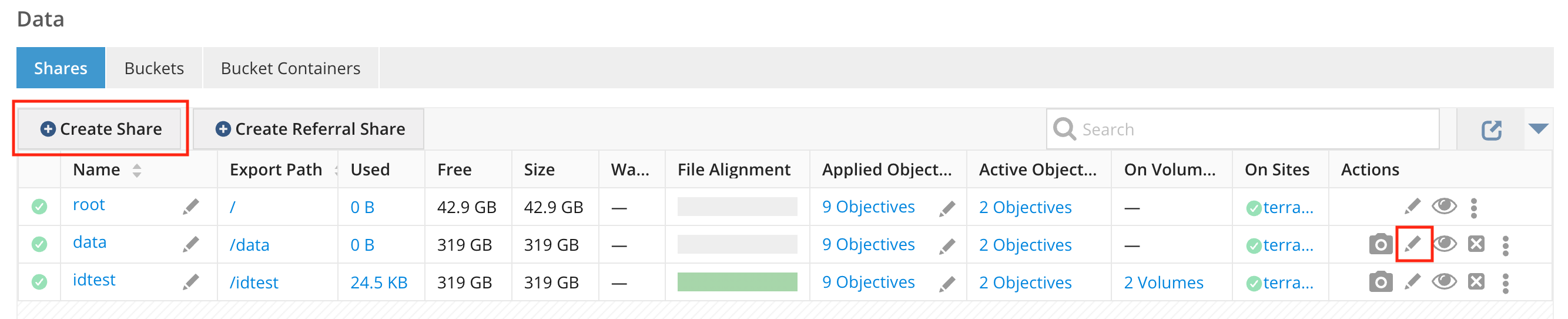 Figure 1. Create a new share or edit the configuration of an existing share
 -
Provide the share details, as needed.
-
Click the NFS tab. If you are adding an export option, continue with the next step. If editing an existing export option, click the pencil icon for that export option and go to Step 4c to select Kerberos security options.
-
Click Add Export Option or the pencil icon, as appropriate, and enter the requested details.
-
Enter the client specification. This can be one of the following:
-
Single host: A single host is specified using either a DNS entry name, a dotted-decimal IPv4 address or an IPv6 address. The IPv6 address must not be enclosed in square braces.
-
IP network: An IP network or subnet is specified using an IP address and a netmask in the format address/netmask. The address is specified either as a dotted-decimal IPv4 address, or as an IPv6 address. The netmask, which must be contiguous, is specified either in dotted-decimal IPv4 format or as a contiguous mask length.
-
Wildcards: The wildcard operators '' and '?', as well as a square-bracket enclosed class of characters, may be used to match multiple hostnames. The '' will match all characters, including dots, and so may be used to specify an entire subdomain or a class of machines within that subdomain. e.g.
*.my.local.domain`will match any machine in the subdomain my.local.domain, includingwww.this.machine.is.in.my.local.domain.
-
-
Grant the appropriate access by checking the radio button for Read-Only or Read/Write.
-
In the Security section, select the appropriate security mode for the share. You do not have to keep UNIX enabled unless you are comfortable with users accessing the system in this manner. Typically, users tend to opt for one approach or the other: strong security with Kerberos or weak security with UNIX settings. The Kerberos security options include
-
Krb5 - Kerberos v5 authentication: Provides cryptographic proof of a user’s identity in each RPC request. This provides strong verification of user identity when accessing data on the server. Note that additional configuration, beyond adding this mount option, is required to enable Kerberos security.
Very few people use basic Kerberos v5 because it is trivial to hack in a man-in-the-middle attack. -
Krb5i - Kerberos v5 authentication with integrity check: Provides a cryptographically strong guarantee that the data in each RPC request has not been tampered with.
krb5i makes it less easy for the attacker to modify the payload of the RPC call, but leaves the RPC call and the reply vulnerable to interception if your network is insecure. -
Krb5p - Kerberos v5 authentication, integrity checking, and privacy protection: Encrypts every RPC request to prevent data exposure during network transit. Expect a performance impact when using integrity checking or encryption.
krb5p is the only option that offers complete over-the-wire security without the help of some third-party encryption (e.g., TLS).
-
-
-
Select whether to root squash. Checking the box specifies that requests from the UNIX UID/GID 0, or from the Windows administrator account, are mapped to the anonymous UID/GID.
-
Secure port is checked by default. Unselecting this option disables the requirement that NFS client connections must originate from a privileged source port < 1024.
-
After making your selections, click Add if you are adding a new export, or Update if you are editing an existing export. A bar at the bottom of the window shows the progress of the change and will show when it is complete.
-
If you are in the process of creating a share, continue with the configuration. If editing an existing share or export, click Close.
-
After you have finished configuring the share, you can view the export configuration, which displays the Kerberos security flavor in the Exports list.
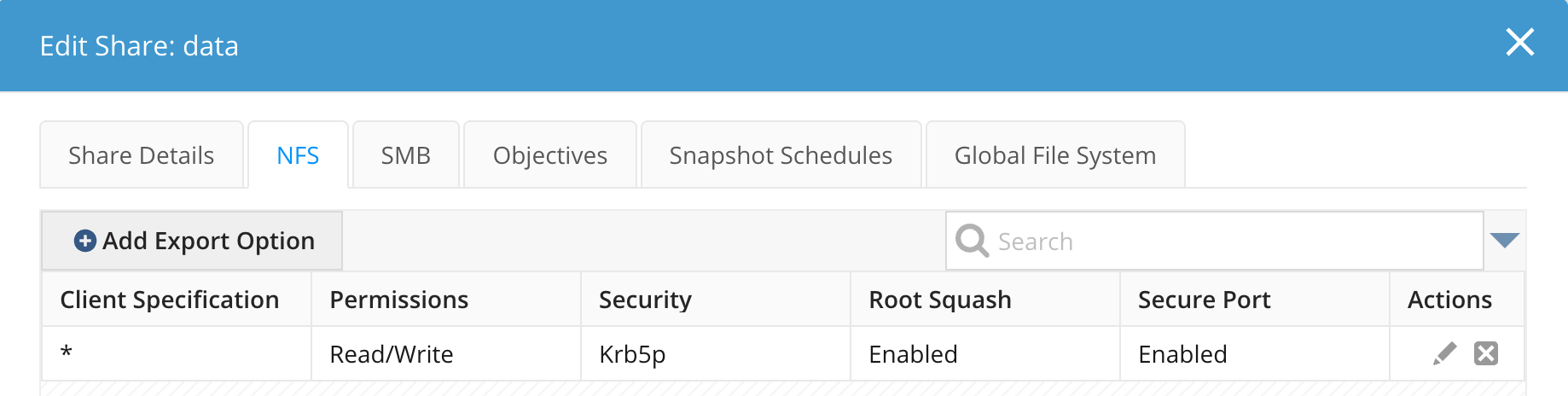
Automatic Kerberos Export Options on the Root Share
NFS clients must be able to traverse the root share to reach a kerberized share. For this reason, when you add Kerberos security types to the export options of any share, Hammerspace automatically ensures the root share also permits Kerberos.
When you add Kerberos security types to a share, Hammerspace adjusts the root share as follows:
-
If the root share already has a Kerberos security type, nothing changes.
-
Otherwise, if the root share has an export option with a wildcard subnet (
*), Hammerspace adds the Kerberos security types to that existing export option. This applies both to the default root-share export option and to a customized one — for example, a root share made read-only, or with a changedroot-squashsetting. Existing security flavors are preserved. For example, the default option*,rw,no-root-squash,sec=sysbecomes:*,rw,no-root-squash,sec=sys:krb5:krb5i:krb5p -
If the root share has no wildcard-subnet export option, Hammerspace creates one. The created export option is read-only with root-squash enabled, and does not include the
syssecurity flavor:*,ro,root-squash,sec=krb5:krb5i:krb5p
When you remove the Kerberos security types from the last non-root share that has them, Hammerspace reverses the change ("dekerberize"):
-
If the root share has no Kerberos security types, nothing changes.
-
If the root share has no wildcard-subnet export option, nothing changes.
-
Otherwise, Hammerspace removes all Kerberos security types from the wildcard export option, leaving any non-Kerberos security flavors in place.
A share can have only one export option per subnet, so there is never more than one wildcard-subnet export option to reconcile.
Enabling the NFSv4.1 Service
To enable NFSv4.1 support via the DSX data portals, use the following Admin CLI command:
dp-update --enable --data-portal-id <ID>You can also use:
-
node-name <node-name>
-
data-portal-type <type>
This command activates the NFSv4.1 service on the specified data portal. It is important because NFSv4.1 is not enabled by default in some deployments.
Registering NFS Principal Names
In the Admin CLI
Use the following command to create NFS SPNs in Active Directory automatically:
Command:
ad-config --nfs-spns-createIn the Management GUI
Navigate to and move SPNs from the Required SPNs box to the Registered SPNs box using the double-arrow button.
| If SPNs fail to register because the computer account lacks the necessary Active Directory permission, see Active Directory Permissions. |
DNS Requirements
Hostnames used in SPNs must resolve correctly via DNS. Use the following command to ensure floating IPs are registered in AD DNS.
Command:
ad-config --dns-auto-register-floating-ips-enableAutomatic DNS registration can also be enabled from the Management GUI when joining the domain. See Joining an Active Directory Domain for the GUI procedure, the DNS names involved, and the records to create.
If you’d rather choose which addresses are registered instead of registering all floating IPs automatically, use --dns-configured-ips (or --dns-configured-ip-add / --dns-configured-ip-remove to manage the list incrementally). See the ad-config CLI reference for the full option list.
Joining Active Directory
Joining Active Directory is covered in depth in the section, Joining an Active Directory Domain.
Client Configuration
Client requirements for using Kerberos mount options with Active Directory:
-
Client krb5.conf should be properly configured with settings such as default_realm, dns_lookup_realm set to true, and dns_lookup_kdc set to true, pointing to your AD KDC.
See the following example of a properly configured krb5.conf file for reference:Example of krb5.conf[libdefaults] default_realm = WIN.AD.TEST dns_lookup_realm = true dns_lookup_kdc = true rdns = false ticket_lifetime = 24h forwardable = true udp_preference_limit = 0 [realms] WIN.AD.TEST = { kdc = win2012r21.win.ad.test admin_server = win2012r21.win.ad.test } [domain_realm] .win.ad.test = WIN.AD.TEST win.ad.test = WIN.AD.TEST -
Client systems should be joined to the Active Directory domain (e.g., using realm join -U <username> <AD_domain>).
-
Client idmapd.conf and sssd.conf files must be properly configured to map to your AD domain for identity management.
See the following examples of properly configured idmapd.conf and sssd.conf files for reference:Example of idmapd.conf[General] Verbosity = 3 Domain = win.ad.test [Translation] Method = sss [Mapping] Nobody-User = nobody Nobody-Group = nobody
Example of sssd.conf[sssd] domains = win.ad.test config_file_version = 2 services = nss, pam [domain/win.ad.test] ad_domain = win.ad.test krb5_realm = WIN.AD.TEST realmd_tags = manages-system joined-with-adcli cache_credentials = True id_provider = ad krb5_store_password_if_offline = True default_shell = /bin/bash ldap_id_mapping = False use_fully_qualified_names = True fallback_homedir = /home/%u@%d access_provider = ad
SSD can introduce delays if it cannot reach a domain. You can set ad_enabled_domains in sssd.conf so that SSD ignores any domains not listed. This could potentially help in resolving slow mount or directory listing.
Mounting a Share Using Kerberos Security
It is required to use the FQDN for the hostname when mounting using Kerberos.
|
The first mount of a share using NFSv4.1 with Kerberos may take slightly longer than later mounts, because the initial mount coordinates across the client, data portal, DSX, Anvil, and Active Directory domain controller. Subsequent mounts complete quickly. A first-mount delay of several seconds is not expected and usually points to a configuration problem. When ID mapping is enabled and one or more trusted Active Directory domains is offline or unreachable, |